
Flying down to Burbank this morning I could see the smoke from the massive forest fire that has been raging in the hills to the North of Los Angeles since Labor Day. I heard that they beat back the flames using a DC-10 reconfigured for firefighting and while looking for a photo of this jet, I found this video of a 747 in a flight test. Too bad it’s not approved for use.
Month: September 2006
-
Polaroid-o-nizer – creating an online version of a classic offline medium
All sorts of fun this week with image manipulation. The Image-Rich Blogroll got a fair bit of play but there was some grumbling on that it was too manual. Yes, it would be good to automate this stuff I dream up – that’s a project for a rainy day.
Next on the agenda of cool web services that could be used in interesting ways is B3ta’s Polaroid-o-nizer service. Point it to any image file URL, type in some text and then hit the “Onize” button and they’ll generate a realistic looking Polaroid of the image.
There’s even a check box if you want to upload the image to Imageshack to have them host your image for you.
So if earlier this week the project was a graphical representation of your blogroll, how about using Polaroid-o-nizer to become your annotated feed of images you come across on the web?
– found while reading Pacific IT
-
Undocumented “spouse-finder” feature in Facebook
With all the hoohah over Facebook’s mini-feed feature, one new service was exposed that I didn’t see in the documentation anywhere. Rather than setting up a simple match-making service, the folks at Facebook have pushed the envelope with their online, add-a-spouse feature.
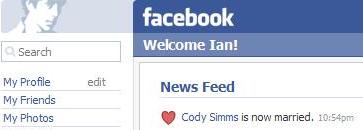
I was about to send off a hearty congratulations to my colleague when I realized that it was an odd hour to hitch up (unless you’re in Vegas) and that this strange, out of context blip on my social news channel was more likely the result of Cody beginning to fiddle with his newly minted profile.
Intrigued, I decided that I too would like to announce my marriage of eight years in the dark of night just for a laugh. I set out to edit my profile and look for the section where one might identify one’s marital state. There it was, on the under the basic tab, “Married to. . . ” The ellipses drifting off in the distance, just waiting for you to type your spouse’s name. Yet, instead of taking a random string and saying, “Thank you, and good day,” Facebook assumes that your bride, is also on Facebook and that that what you really want to do is find her profile and link to it. So instead of being able to identify my wife’s name and introduce her to my budding community – I’m shunted off to a list of ladies also named Izumi that I might like to, and this is really one of the great moments in interface design, “Add as Spouse”
I have no doubt Facebook is a great place to meet people but there’s something unsettling about seeing a list of 79 alternative wives that can be “added” with the click of the mouse. I haven’t had the nerve to actually click on any of these links for fear of what would happen at the other end. Would the alternative Izumi get a coldly worded confirmation notice from me asking a few terse questions about how we hooked up and to indeed confirm that we are joined ’til death do us part? Does it send flowers?
Clearly this is just a glitch in their UI desgin where another feature just got ported over without really thinking about the impact but it does point to another thing that has been bugging me about Facebook, it’s all about feeding stuff in but never letting it out. The ability to add an RSS feed to your profile is a cool trick. I don’t actually hang out in Facebook too often so this is a way to let my off-network vitality drive my Facebook profile. Funny thing is, none of the links drive back to my site which is spawning all this activity! From Facebook’s perspective, it’s all about keeping users tied into a self-referential experience on the Facebook servers.
This, keep ’em on our servers, perspective is why I’m given a list of Izumi’s to marry from Facebook’s community. It’s about “user lock-in” – a term I’ve come to loath. Heck, I’m given more freedom when I choose my interests on my profile! Here I’m given a blank, white box in which to enter books and music I like – here I could have actually *used* some direction as to what other people are calling things they call “interests.” I just realized, upon review, that identifying “kids” as one of my interests could probably be interpreted differently. A little direction here as to the best way to say you spend a lot of your time hanging out with your offspring would have been welcome a couple of months ago when I set things up. Hope I’m not on any kind of watch list anywhere.
Ok – keep the, “hey old-timer” comments to a minimum. These UI bugs are still whacked and they’re going to need to get these straight before opening up to the general public which does include people that are married with kids.
Come on Facebook – you can do better than this!
-
How to Create a Thumbnail Blogroll, a 20-minute hack
Yahoo! had one of its internal hack days [1] today and while work kept me from devoting enough time to work on an effort on the scale of last time, an email at 9am this morning did give me the chance to show at least something at today’s show-n-tell.
I’ve been thinking of picture-in-picture badges for a while now and like the concept of a blog’s sidebar acting as a portal to your editorial view of the world. Match this navigational concept to the fact that badges are becoming more and more like the online equivalent of wearing a branded t-shirt and colleague Cody Simms thought was there’s an opportunity for a badge which showed a collection of websites you liked.
So when I got an email from FavoriteThingz (no longer in service) that they have opened up their service to allow you to create multiple badges of just about anything you could think of, neurons fired off on a way to update the tired-looking plain text blogroll.
Faces of people you read like those you see on MyBlogLog (which is totally rad for its own reasons) don’t really work in the context of a blogroll when it’s faces of people you don’t really know. Japanese salarymen have a saying that your business card is your “face” and in much the same way, your blog is “your face” on the internet.
It’s not really a hack (more like a “hand-cranked mashup”) but it’s a cool concept just dying for a little scripting. So here it is, in five easy steps:
1. Go to the webpage thumbnail creation service, webshotspro.com, and enter the URL of a blog on your blogroll into the form on the page.
2. Right click on the 400×300 pixel image and save the image file locally.
3. Go to favoritethingz.com (no longer in service) and create a new badge. Click “add thingz” and “add items manually” on the next page.
4. Select “custom” from the dropdown and enter the blog’s title, URL, and “browse” to select the image file you just saved. Click “save & add another”
5. Repeat.
There you have it! Generate the code for the badge and copy it into your sidebar or anywhere else on your page for a cool looking interactive widget which is way more interesting than a long list of text links. For an example, check out how it looks on my blogroll page. (Favoritethingz, the service that hosted this hack is no longer in service.)
[1] Thank you Leonard & Chris Plasser for organizing a bang up Hack Day. I think I’m safe in saying that my hack was by far the least technically spectacular of the bunch. I had to leave early but did get the watch a few of the demos via the live feed and have to say that the hacks (over 100 by my count) this time around were even more impressive than before. The theme seemed to be, “simple yet revolutionary” – it’s amazing what you can do with a few lines of code these days.
-
Sony Mylo
Forgive the commercial break – Sony Mylo is pretty cool though – just testing video embedding on a post. -
Top 10 Presentations
I pretty much agree with all the presentations on this list except for the exclusion of zefrank’s performance at the TED conference in 2004.
-
Microsoft Max
Like everyone else who follows RSS readers closely, I downloaded the new Microsoft Max application and started playing around with it. The application is stunning in its presentation and really shows off what you can do with Microsoft’s .NET Framework and, kudos to Microsoft for releasing this as a prototype for future development.
As an RSS newsreader there are limitations (no OPML import/export for one) but it’s the picture sharing feature in the service that has me scratching my head. When you install Max (Windows only), it scans your hard disk for photos that you can add to “lists.” Photos are managed locally and you can do some pretty cool things like the apply a 3D Mantle view shown above. You can also share your photos with others and here’s where it gets strange. Sharing is done via. . . e-mail.
Microsoft Max sends your friend an email invitation to download and install Max which requires a Mircrosoft Passport account. According to the Microsoft Max blog, here’s what happens next (emphasis mine):
When one of your friends opens Max and clicks Other people’s lists, they’ll see an invitation to download your list. They’ll see the list’s title and message, but they won’t see any of the list’s photos.
Once they accept the list, they can use Max to connect to your computer and download the photos. If you’re signed in, they’ll be able to download the photos. If you’re signed out, your friends will see you as offline and they won’t be able to download your photos.
So two Max users then have permissioned access to each other’s Windows file system!
It’ll be interesting to see what happens over the next couple of weeks as the early adopter crowd plays around with this. Swapping photos around is going to open up ports all over the place and I’m sure Microsoft will see a blip in new signups to their Passport service as people install the app to try it out. If the service is just a proof-of-concept, imagine what a talented developer could do to extend this service to slide other types of files into the peer-to-peer queue – videos, audio, documents, and software.
How about a version of Max to distribute software patches to Windows?
-
1K Project
The 1K Project overlays 1,000 replays from the PC game Trackmania and composites them into a single video. A lesson in automotive physics and combustion driven liquid dynamics. No one knows who made this video or where it came from.
