Year: 2013

  • The Art of Product Management

    The Art of Product Management

    Many start up Product Managers are lone wolf types. They work alone, part of a team, but the only one in that team doing what they do. Shuttling between engineering, design, sales, marketing, management and other constituents, they are the glue that ties the team together, the universal joint making sure all the momentum in one group transmits cleanly to the next so all the pieces move in unison and things get done.

    Because they work alone, Product Managers have developed their own set of tools that work for them and their company. Tips and tricks on how to organize teams and set priorities are passed around like folklore on blogs and Quora posts but it’s rare to find an event that gets a room full of PMs sharing what works in real-time.

    Perhaps it’s a sign of a maturing industry legitimizing a role but over the past several weeks, I have had the good fortune to attend three (!) events specifically for the modern Product Managers.

    Each of these events were great in their own right but it was this past Friday’s How to Build Great Products hosted by Ty Ahmad-Taylor of Samsung and Josh Elman of Greylock Partners really knocked it out of the park.

    What I Learned

    Many PMs fell into their role before they realized that they were doing it. Especially at small start ups on a hyper growth trajectory, the PM is the first to jump in to rally and organize and bring teams together and ends up creating their job.

    PMs need to have a singular focus on what needs to get done to make their product successful. This means sometimes going against corporate objectives. Hunter Walk, when he was a PM at YouTube, put priority on supporting Facebook login over Google’s own competitive Open Social login initiative. You need to look at the market as a consumer and make the choice based on what’s right for the customer, even if it sometimes goes against larger corporate initiatives.

    PMs need to be entrepreneurs. Faced with a limited amount of resources, you need do whatever it takes to get things done. This often means you need to think creatively. Hunter also mentioned “learning to draft ascending ecosystems” – take an objective look at the market and if there is a way for you to bundle or integrate your product into another product on the rise. By focusing on getting the YouTube icon added to the default iPhone deck, all other conversations with carriers turned from YouTube chasing them to the carriers calling YouTube. Picking the ascending leader early was a bet that paid off.

    Trust Your Strategy. Allen Blue, the co-founder of LinkedIn, described the first year of nominal growth (2,100 users after one week, 80,000 after 7 months). They reserved a bottle of whiskey for when they hit 1 million users but ended up drinking at 500,000.

    PMs are problem solvers, give them meaty problems to chew on. Like Allen, many PMs come from varied backgrounds. Allen came from the theatre. Because of their non-traditional training (Hunter Walk too, was one of the few PMs at Google without a CS degree), a PMs can be the source of a unique perspective and often solution. One useful technique to use when drilling down to the essence of a problem is by using the 5 Hows which is a derivative of the 5 Whys, designed to lead you to a solution, not causality.

    Srikanth Rajagopalan on building the Chrome Browser

    “Speed is a feature.” This is often ignored when prioritizing tasks. Do not forget that simplicity, and it’s cousin, speed, are silent feature requests that should always be potentials for any roadmap discussion.

    Build for the average user but do not ignore your super fans by hiding power user features. Chrome has a number of geeky features (Keyboard shortcuts that one could only appreciate if you, “grew up with vi”) but they are tucked away and do not get in the way of the basic user’s core experience. Deciding how to add an advanced feature is difficult. Putting it into Settings and letting the user choose is lazy. Did you know  Chrome has a detailed Site Info box?
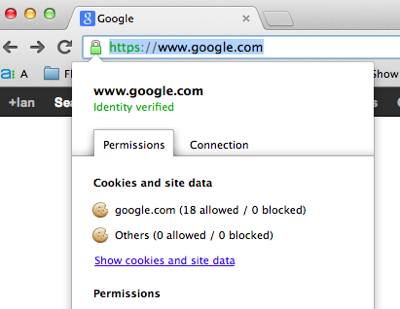
    Chrome Site Info

    There was a panel discussion about user growth where I unfortunately had to step out for a bit but I did catch Elliot Shmukler talk about the power of shared metrics. During his days at LinkedIn, he pulled together the most important metrics into an information radiator so that everyone gets a realtime view of these metrics with just a glance. But one must not forget to focus on the right metrics. Too often a dashboard is swamped with metrics where it’s too easy to drown in data. Pick 3-5 metrics and use those to test intuition. Be careful which metrics you chose because those will be the ones you optimize for.

    A funny anecdote Elliot shared was coming in one morning to find, “Belgium on fire.” User acquisition spiked overnight because an engineer, after looking at these shared metrics, fiddled with some of the contact importing settings for users in that country to see if it would move the needle. It did. That is the power of shared metrics.

    Dan Olsen gave an entertaining talk about his time at Friendster during their meltdown and subsequent loss to MySpace. See slide 21 which shows how he came up with the concept of the viral loop (no one was doing this kind of stuff then) and how different points in that loop have different amplification values.

    Despite succeeding in rolling out several new features that helped in user growth, we all know the story about poor database optimization that ultimately ruined the experience on Friendster so that the more users joined, the slower the site became. Dan’s learnings were that, for social networks, a large user base is a feature. People used MySpace because that was where the majority of their friends were which lead to, um, a majority of their friends being on MySpace.

    Fred Sigman, an Art Historian & Photographer, gave an thoughtful talk about the influence of nearby atomic bomb testing on the neon signs of early Las Vegas. As a post-lunch talk, professor Sigman’s talk was perfect as the, “palette cleanser” talk before we got to the. . .
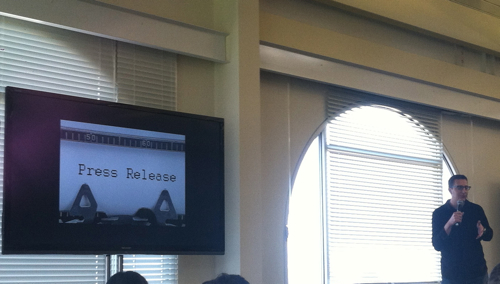
    Ian Mcallister

    Ignite talks. These are lightning round, Pechakucha-style presentations where the slides self-advance. Highlights for me were Ken Norton’s How (not) to work with Engineers and Ian McAllister’s talk about the User-Driven Development which I’ve written about before.

    Joe Zadeh from AirBnB spoke about the hiring process at his company. Forgive the fuzzy resolution but it’s the nut of his talk which explained that all PMs that are interviewed are invited in to present on a topic given to candidates in advance. This allows them to evaluate all the candidate along a baseline for a number of things simultaneously,

    • Can they communicate effectively?
    • What’s their design skill like? Do they understand spacing, fonts, color, use of graphics?
    • Are they nervous presenting? How do they respond to questions, pressure?
    • Did they have a fresh approach? Are they an original thinker?
    Joe Zadeh on how to interview a PM

    If the interview is for a Product Manager, they may make it about a specific problem they are trying to solve. When they were looking into adding a payments processor in South America, they asked prospects to speak that topic. By the end of the interviews, they had not only a good sense of who knew what, they also got six different approaches to integrating payments processors.

    James Buckhouse from Twitter gave an great talk about storytelling. @buckhouse came from Dreamworks and tells stories for twitter and shared his formula for how to tell a good story. It’s all about the journey to a transformation. He writes about writing on Medium at Design Story.
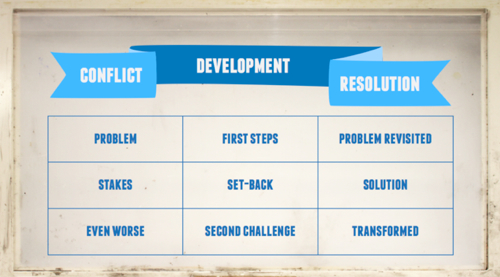
    James Buckhouse on storytelling

    The final talk of the day was with Tom Conrad at Pandora. No slides, just a simple discussion between Josh Elman and Tom about the early days of Pandora and it’s inspiration (“I loved to recommend music to people. Building a service was a lot easier than inviting people to my dorm room.”) but also included a varient of the “let’s go shopping” style of roadmap prioritization.

    1. Every 90 days, wipe your roadmap clean.
    2. Ask everyone in the company what things the company would be crazy not to do. This includes projects that used to be on the roadmap but are now off it.
    3. Summarize each idea on one slide. Work with engineering to come up with a thumbnail estimate for how many days it’ll take for each project. If a project will take one weeks’ development by two developers, that’s a $10 project.
    4. Print out each slide and stick them up on a wall.
    5. Sit with Engineering and decide how many developer man-days you have for the next 90 days. If it’s 60 working days and you have 2 developers, and you need to reserve 10 days for maintenance, that means you have 110 developer man-days. This would equal $120.
    6. Invite a cross-representative group of people to a product prioritization meeting. At Pandora, this included someone from HR. Give each person a different colored post-it note with equal amounts that they can allocate towards projects. If there are 5 people in the room, then that’s $24 each.
    7. It will be a long meeting but, by the end, you’ll clearly see which projects are “fully funded” and those will be the ones that you take on for the next 90 days.

    Everyone leaving that room will have a clear view of what engineering is going to be working on better than any Roadmap document could tell them. There will be no need to brief people on what each project is because they will have heard the description of each project in that meeting.

    I hope you found this post useful. I’m gathering these tips and tricks into a collection. If there are some that you feel should be included, let me know.

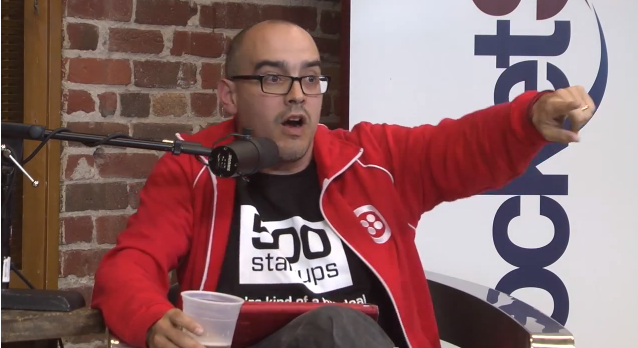
    The view from ProductSF
  • Dave McClure: One can only go to Zero

    Dave McClure: One can only go to Zero

    I was listening to Jason Calacanis interview Dave McClure on his This Week in Startups podcast and had to share this amazing rant on the sorry state of investing in the United States. Dave rants on the lopsided, systemic governmental bias towards the real estate business. The worst you can do when you invest in a start-up is lose all your money while, with real estate, you can leverage your down-payment to the point where you’re upside down on your mortgage and have to have your backing institutions bailed out by the taxpayers.

    There will be people in their 70’s who are clearly credited investors with millions of dollars who should not be investing in fucking startups and there are kids with $10 in their pocket who know more than you or I do. Net worth is not the intelligence test for investing in startups.

    There’s a certain amount of money that anyone should be able to fucking burn or blow on startups. We encourage a ridiculous amount of money to go into the residential real estate market which has burned people fucking terribly in the last five years. Ridiculous numbers of people in this country are upside down on their mortgages and bankrupt because legitimate, regulatory-approved agents have shoved real estate fucking mortgages down their throats. We have subsidized this with our tax dollars, we are the people.

    Like you fucking blame the investment bankers? Fuck You.

    It’s you voting for your representatives who are in the pockets of Sallie Mae Ginnie Mae, Fannie Mae, whatever who are shoving shit down the pipe. Like Moody’s and all these other people who have crap verification. . .

    If you want to protect the small investor, don’t let them buy a house in this country, because that is the most dangerous thing you can do with your money. Period.

    Investing in startups which might fail? You only lose $1. You invest in a house, you put 5% down or sometimes 0% down and you can lever up a ridiculous amount of money. You can lose 20 times your investment and people do it every day and they think it’s a good idea.

    The whole interview is amazing but scroll forward to the 1:00:00 for the rant on “accredited investor” requirement for start-up investors.

  • Feature List for an RSS Reader

    With the announcement of the sunsetting (never did like that word) of Google Reader, a discussion was kicked off at work over what features would make up an ideal RSS reader. Everyone at GigaOM is a voracious reader so we like to compare information processing tools and techniques like foodies discuss recipes.

    Here’s my short list:

    • Must be able to import an OPML file. The easiest way to get started is to load up your existing collection of feeds.
    • Must export OPML. Never trust a platform that doesn’t support data portability.
    • Must keep track of what you’ve read.
    • Must have a mobile version that syncs what you’ve read with on the desktop, mobile, or anywhere else
    • Must support pubsubhubub so news is pushed and realtime if the feed supports it.
    • Must be able to browse by feed or as an aggregated, reverse-chron sorted river of news
    • Must support browsing by headline, excerpt, or full-text
    • Must support rich media so the reader can be used to browse video, podcasts, and photo feeds. Bonus points if you can output a photo feed as a screensaver.

    Then there are the extra features are what would put one reader above others

    • Provide search across all feeds. This is your slice of the best of the internet after all.
    • Add the ability to star or otherwise mark items for simple re-tweet behavior. Let people publish a feed of these curated items so others can follow your information exhaust. Even better is to re-create the “share with note” feature in Google Reader and you’ve got a light-weight tumblr network.
    • Add the ability to follow other people and add their feed bundles to your collection. This was the single best feature of Google Reader and the one that, when taken away, killed off the future of the product.
    • Decay. Add a natural decay to feeds that do not get a lot of your attention. Provide a bookmarklet that lets you grab and add feeds as you find interesting posts across the internet but feel safe in the fact that if you let a feeds’ post go unread, that the feed itself will eventually drop off your main view, keeping things clean and focused.
    • In the day and age of Twitter & Facebook, have a pre-set filter that reads your social feeds and parses out all the links you add and puts them into a folder which you can search across or curate & share back out.

    Finally, there is the uber-geeky-cool feature that I built with the MyBlogLog team, the Interest Engine. The vision was that you would pipe all your feeds through the reader and the tags on all those feeds and shares would feed the algorithm to improve what bubbles up in your aggregated newsfeed. If you subscribe to a bunch of blogs about “fly fishing,” use that as a signal and focus posts from other, more generic feeds on your interests so that if a story about Fly Fishing flows across your New York Times feed, it gets higher placement.

    So that’s my list of MVP features & nice to have differentiators.  Did I miss any?

    UPDATE:

    Some choice words from Chris Wetherell, one of the original engineers on Google Reader, on the effervescent business opportunity of the GReader community.

    Dave Winer shares his thoughts on how he would build RSS anew. Centralized OPML profiles (as were offered by GReader) are key.

  • Internet of Things – What Things?

    Internet of Things – What Things?

    All joking aside, the internet of things is a technology looking for a use. The geek in us tells us that connecting devices together is a good thing. Networks are better than the sum of it’s parts. Choice is better than none at all.

    Back in the day, I had a friend who set up a macro on his Palm V to wake up each morning and emulate his remote control and turn on and tune his TV to the morning news. Sure he had to remember to set his Palm on the coffee table each night so the IR sensor could reach his television but the combination of a simple cron entry and an IR emulator added value not only to the Palm but also to the TV which had a new purpose as an alarm clock.

    Let’s run through some of the previously inanimate objects that now can be addressed by a network. I’m not including things such as a computer or the Arduino which is like the breadboard for the internet of things. I’m focused more on single purpose devices or sensors which can be networked. A partial list includes,

    What happens when we hook this stuff together in the cloud. What use cases can you imagine?

    More reading:

    GigaOM posts tagged Internet of Things

    ReadWrite posts tagged Internet of Things

    TechCrunch posts tagged Internet of Things

    Mashable posts tagged Internet of Things

  • My Kitchen Just Crashed

    It started with devices such as Nest, the connected thermostat, and Withings, the connect scale. As more and more devices hook into our home network, the opportunity to have them talk to each other begets scenarios that harken back to the Connected Home visions from the 90s. Remember the internet-enabled refrigerator? Samsung now makes one.

    All this reminded me of this piece about the Connected Home that was floating around on usenet way back in the day. It’s enjoyable to read as a lens into the mid-90s and what they thought of the future. It also reminds us of how far we’ve come. Thanks to Google Groups’ archive I was able to dig up the original which unfortunately was never signed. Enjoy.

    The Diary of a Digital Homeowner:

    Nov 28, 1997:
    Moved in to my new digitally-maxed out Hermosa Beach house at last. Finally, we live in the smartest house in the neighborhood. Everything’s networked.  The cable TV is connected to our phone, which is connected to my personal computer, which is connected to the power lines, all the appliances and the security system.  Everything runs off a universal remote with the friendliest interface I’ve ever used. Programming is a snap.  I’m like, totally wired.

    Nov 30:
    Hot Stuff!  Programmed my VCR from the office, turned up the thermostat and switched on the lights with the car phone, remotely tweaked the oven a few degrees for my pizza. Everything nice & cozy when I arrived. Maybe I should get the universal remote surgically attached.

    Dec 1:
    Had to call the SmartHouse people today about bandwidth problems.  The TV drops to about 2 frames/second when I’m talking on the phone.  They insist it’s a problem with the cable company’s compression algorithms. How do they expect me to order things from the Home Shopping Channel?

    Dec 3:
    Got my first SmartHouse invoice today and was unpleasantly surprised. I suspect the cleaning woman of reading Usenet from the washing machine interface when I’m not here.  She must be downloading one hell of a lot of GIFs from the binary groups, because packet charges were through the roof on the invoice.

    Dec 8:
    Yesterday, the kitchen CRASHED.  Freak event.  As I opened the refrigerator door, the light bulb blew. Immediately, everything else electrical shut down — lights, microwave, coffee maker — everything. Carefully unplugged and replugged all the appliances. Nothing.

    Call the cable company (but not from the kitchen phone).  They refer me to the utility.  The utility insists that the problem is in the software.  So the software company runs some remote telediagnostics via my house processor.  Their expert system claims it has to be the utility’s fault.  I don’t care, I just want my kitchen back.  More phone calls; more remote diag’s.

    Turns out the problem was “unanticipated failure mode”:  The network had never seen a refrigerator bulb failure while the door was open. So the fuzzy logic interpreted the burnout as a power surge and shut down the entire kitchen.  But because sensor memory confirmed that there hadn’t actually been a power surge, the kitchen logic sequence was confused and it couldn’t do a standard restart.  The utility guy swears this was the first time this has ever happened.  Rebooting the kitchen took over an hour.

    Dec 7:
    The police are not happy.  Our house keeps calling them for help.  We discover that whenever we play the TV or stereo above 25 decibels, it creates patterns of micro-vibrations that get amplified when they hit the window.  When these vibrations mix with a gust of wind, the security sensors are actuated, and the police computer concludes that someone is trying to break in. Go figure.

    Another glitch:  Whenever the basement is in self-diagnostic mode, the universal remote won’t let me change the channels on my TV.  That means I actually have to get up off the couch and change the channels by hand.  The software and the utility people say this flaw will be fixed in the next upgrade — SmartHouse 2.1. But it’s not ready yet.

    Finally, I’m starting to suspect that the microwave is secretly tuning into the cable system to watch Bay Watch.  The unit is completely inoperable during that same hour.  I guess I can live with that. At least the blender is not tuning in to old I Love Lucy episodes.

    Dec 9:
    I just bought the new Microsoft Home.  Took 93 gigabytes of storage, but it will be worth it, I think. The house should be much easier to use and should really do everything.  I had to sign a second mortgage over to Microsoft, but I don’t mind:  I don’t really own my house now–it’s really the bank. Let them deal with Microsoft.

    Dec 10:
    I’m beginning to have doubts about Microsoft House. I keep getting an hourglass symbol showing up when I want to run the dishwasher.

    Dec 12:
    This is a nightmare.  There’s a virus in the house.  My personal computer caught it while browsing on the public access network.  I come home and the living room is a sauna, the bedroom windows are covered with ice, the refrigerator has defrosted, the washing machine has flooded the basement, the garage door is cycling up and down and the TV is stuck on the home shopping channel.  Throughout the house, lights flicker like stroboscopes until they explode from the strain. Broken glass is everywhere. Of course, the security sensors detect nothing.

    I look at a message slowly throbbing on my personal computer screen: WELCOME TO HomeWrecker!!! NOW THE FUN BEGINS …  (Be it ever so humble, there’s no virus like the HomeWrecker…).

    Dec 18:
    They think they’ve digitally disinfected the house, but the place is a shambles.  Pipes have burst and we’re not completely sure we’ve got the part of the virus that attacks toilets. Nevertheless, the Exorcists (as the anti-virus SWAT team members like to call themselves) are confident the worst is over. “HomeWrecker is pretty bad” one of them tells me, “but consider yourself lucky you didn’t get PolterGeist.  That one is really evil.”

    Dec 19:
    Apparently, our house isn’t insured for viruses.  “Fires and mudslides, yes,” says the claims adjuster. “Viruses, no.” My agreement with the SmartHouse people explicitly states that all claims and warranties are null and void if any appliance or computer in my house networks in any way, shape or form with a non-certified online service.  Everybody’s very, very, sorry, but they can’t be expected to anticipate every virus that might be created.

    We call our lawyer.  He laughs.  He’s excited!

    Dec 21:
    I get a call from a SmartHouse sales rep.  As a special holiday offer, we get the free opportunity to become a beta site for the company’s new SmartHouse 2.1 upgrade.  He says I’ll be able to meet the programmers personally.  “Sure,” I tell him.

  • Google Glass and Time Travel

    A lot has been written about how Google Glass will be great for those that put on a pair. Immediate access to the world’s most powerful database, push alerts from your closest friends, a voice UI so you can look up directions without having to look down at your phone, a  camera that lets you take a photo and share a moment, all without leaving that moment.

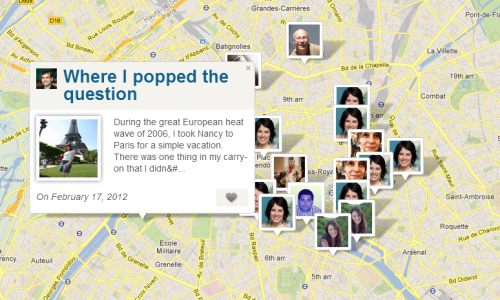
    While these are all powerful use cases that are bound to transform how we interact with the world around us, I’m more excited for the capability of Google Glass to annotate the physical world as we travel through it for those that come after us, especially those that can re-experience that world, as we saw it, in context. Imagine being able to take a photo of Notre Dame in Paris today, on a trip with your family and saving those photos with all the GPS data so the photo has a place, on a map, in time. Add a community and you have a series of photos of a place, all taken from different perspectives. This, of course, is flickr’s world map – announced in 2004 under the tagline, “eyes of the world.”

    While a picture is worth 1,000 words, what if you could add more context. What if you could add more text to your photo? Tell a story that shared how this photo, in this place, was important to you? This is Findery.com, a place where people leave notes for each other in space and time. As described in their FAQ,

    Findery is made of notes. A note can be a story, advice, jokes, diatribes, information, memories, facts, advertisements, love letters, grocery lists and manifestos. The content of a note is only limited by your imagination. A note can be shared with the world, one to many people, one to one, or only with yourself.

    Findery and the Flickr Map are compelling maps experiences but imagine how powerful they could be if you could experience them in situ. The mobile versions of Flickr and Google+ get at this with a Nearby feature. This sort allows you to browse photos that are nearby to your GPS location. I’ve used it a few times but rarely is it compelling. Even if the photos are only a block away, they lose their connective tissue.

    While Google Glass is interesting as an information capture device, the possibility of a viewing device that can potentially line up photos that are taken at the same place is something that really excites me. Once you have a head’s up display connected to a vast library of GPS-tagged photos you can enable clever overlays that show you not only the space around you but also that same space through time.

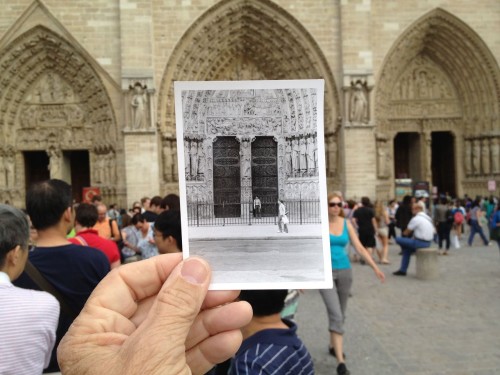
    Check out OldSF – it’s a completely voluntary effort where two folks came together and took the time to put a bunch of photos from the San Francisco Public Library on to a map so you can browse through them. One of the founders of OldSF blogged about the thrill of overlaying one photos from the past and fading to the present (and back again) where you can basically time travel in real life. It’s a genre called, Now and Then photography most recently cataloged in the site, Dear Photograph

    Imagine being able to pull up photos from your past, your father’s past, or your grandparent’s past. Ask Google Glass for directions to the nearest pinned memory and then bring it up in your glasses and be able to see that moment, captured in time, while standing on the very spot the photographer stood. Add voice annotation, capture some audio. It’s that moment that puts goosebumps on my arms. It’s that moment, reliving history, your personal history, that makes me excited to try out Google Glass someday.

  • House of Cards

    House of Cards

    Just finished all 13 hours of the first season of the latest Netflix series, House of Cards. While I didn’t binge view as some of my colleagues did in the name of journalism, I did find myself staying up later than normal to watch “just one more episode” of this dark cousin to West Wing.

    Apparently Netflix dropped $100 million to produce two 13 episode seasons. The result is a Season One that plays as a 13 hour movie about the dark, evil underbelly of Washington politics. Given such resources and space the characters are wonderfully developed and, if like most, you watch the series over a short span of time, you come to know them as an extension of your reality. The depth and detail of House of Cards makes the typical 2 hour feature film feel like a rough character sketch.

    The series was shot with digital RED cameras which allowed them to shoot takes continually without stopping the camera.

    Obviously, shooting digitally helps, [House of Cards was shot using the RED camera] because I never had to cut. I could say, ‘Go back out and come in again,’ and it’s amazing the pace you get. It’s a Frank Capra trick from way back. Because he could only print so many takes, he used to say, ‘Keep it rolling, go out and come in.’ What he found was people were more energized, and it gave this effervescence, and I ended up having to do that.

    But the most interesting thing is that Netflix decided to release all 13 hours of the first season in one go. At first I was skeptical. Traditional television leaves you with cliff hangers that bring you back each week for what they used to call appointment television. Netflix knows a thing or two about “binge viewing” and based on their data, felt they could generate more buzz if they released everything at once. I agree. The coverage has been fantastic for Netflix and I’m sure it’s driven a spike in membership. Indeed, they are watching data on viewers to inform their next original series.

    Further Reading

    House of Cards’ Forth Wall –  Exploring the lead character’s asides to the camera.

    Playing with a New Deck – details about how multiple director’s filmed the series and were given freedoms not normally extended to directors of television series.

    House of Cards coverage on GigaOM & paidContent


  • Where is the Microsoft Surface theme song?

    Where is the Microsoft Surface theme song?

    For the launch of Windows95, Microsoft licensed Start Me Up from the Rolling Stones as a way to kick off the biggest software upgrade in the company’s history and forever brand Mick Jagger’s crooning with a key feature of Win95.

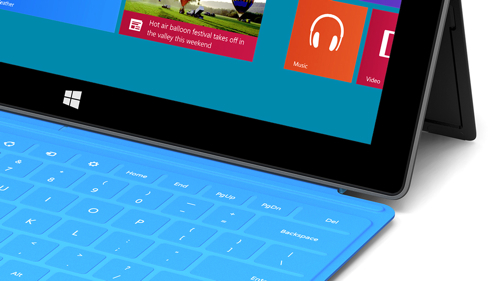
    Now we have the Surface. Where’s the theme song?

  • More about coffee

    More about coffee

    More writing about the value of handmade coffee (vs. those automated Nespresso capsule machines) to follow on my earlier post about Specialty Coffee.

    It is not that handmade is always best, of course. Much technology is itself a testimony to human creativity and ingenuity. Apple has got very rich through supplying technology that is beautifully designed by humans who are as gifted as the best artisans. There is plenty that we should happily allow to be mechanised, for the obvious benefits that brings. But there is plenty else we will continue to prefer to be handmade, because what matters is not just the result, but the process by which you get there. Humans are imperfect, and so a world of perfection that denies the human element can never be truly perfect after all.

    – from Coffee Artisans

    * More George Clooney endorsements over on my Celebrity Endorsements gallery