It’s no coincidence that the Swedish home furnishing superstore IKEA timed the announcement of their AR app IKEA Place to drop shortly after Apple’s much anticipated announcement of their AR-optimized phones the iPhone 8 & iPhone X.
First announced back in June, the final release of IKEA Place will take advantage of Apple’s ARKit to not only match the proper scale, also apply the texture of the material, proper lighting and shadows.
“I think that augmented reality and virtual reality will be a total game changer for retail in the same way as the internet, only this time much faster” said Michael Valdsgaard, IKEA’s head of digital transformation, who leads a team of 70 that have been working the past nine weeks to load thousands of IKEA products into the app in preparation for release next week in conjunction with Apple’s iOS 11.
Dropping a virtual chair into your living room with true to scale is the perfect broad-scale use case for AR. Browsing furniture and sharing screenshots of them in situ before you make a big purchase is what will spread this new tech to the masses.
Saturday Night Live did a pretty good job sending up the Tech Press’ whining over the iPhone 5 problems as out of touch with the world in which we live – especially when compared to the world of those that work in the factories that make these wonder devices.
What follows are notes from a session I attended at the last Web 2.0 Expo. While a few months old, the notes here are still very relevant. As a Nokia employee, some may think it strange for me to blog about how to develop for the iPhone but I think not, the priciples I share here apply to all mobile developers.
The presentation was given by Toby Boudreaux. Point of clarification before we begin. For those unfamiliar, an anti-pattern is a play on design patterns which are re-usable design components that emerge to become commonly understood elements used in User Interface design. A common user interface anti-pattern is the hover text box that obscures an otherwise important part element of the user experience.
On to the iPhone UX Anti-Patterns from Toby’s talk
Billboards & Splash Screens
While it your logo may look cool in all it’s glory and scrolling credits for everyone on the team including the office dog is also seems like a nice thing to do, your users will tire of it after a few times and will get down right annoyed if they use your app with any frequency. Best to tuck this stuff down as a sub-menu off the About menu. In short, “don’t put branding ahead of users.”
Sleight of Hand
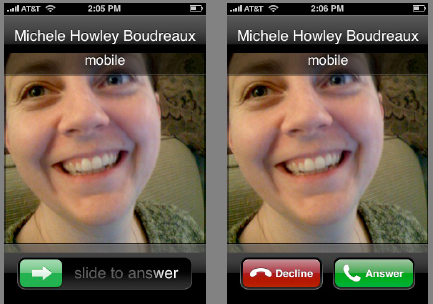
Do not use the same area for different or conflicting functions. Think of muscle memory and make sure that the same gestures are related. Toby illustrated the problem with the iPhone’s slide to unlock and decline functions.
A quick and easy way to avoid this anti-pattern is to print out wireframes of your design and overlay each screen on top of each other over a lightbox and to be careful where your exit or quit button is going to be, assuming that your users may add an extra tap by mistake.
App as OS
When the app is running in a mobile environment, it tends to take over the screen giving the user the impression that the application is the OS. Rather than attempt to mediate the entire experience of the device through your app, defer to specialized apps which are designed to handle those functions. Use the YouTube player for videos, the browser for web pages.
Bullhorns
Tone down any loud notifications. You can provide a setting to make them louder but remember, you’re embedded into a mobile device which is going to be carried everywhere. If possible, avoid pop-up error messages and embed your error message into the interface.
The Bouncer
If your app requires a user account, make sure every screen that can be accessed without a login has a link to registration or sign-up. The last thing you want to do is have a potential registered user land on a login screen with no link to a page where they can register.
The High Bar
Allow for progressive degradation of your application. Remember, you’re app is operating in a mobile environment. Assume that connections will be flakey, the phone not running the latest OS. Remember the guy on the bus that’s just gone into a tunnel. What about the one-handed user on the subway? Can he they use your app effectively?
Memory Lapse
Make sure your application is able to persist state. There’s nothing worse than having to step back through to get back to where you were. The illusion of fast task-switching, pausing and unpausing, requires state persistence.
Gesture Hijacking
Take care not to take over and re-define a popular gesture. It’s a balance because you also don’t want to try and be too clever and introduce a new behavior that has too steep a learning curve.
Spin Zone
Don’t rotate the screen for the heck of it. Fancy UI elements to be used in moderation.
Sound Off
Don’t hijack audio that is already playing. This is a common one. How many times have you been listening to music and then start playing a game that requires you jack the volume way up. When you quit out of the game, you blast your ears off as your music player comes back on.
It’s much better to blend the sounds so the user can take care to switch to the background app and shut it down or pause it.
Apple has done a lot of careful thinking about interface design on the iPhone expanding their work on the Human Interface Guidelines to the mobile environment. The iPhone HIG is a good resource for anyone designing for the mobile environment.
Hope these iPhone UX Anti-Patterns were useful. Can you think of any others?
While Kevin’s friend walked the streets of Chicago with a broadband modem-enabled laptop, they homed in on the actual person who had taken their phone and confronted them.
“Have you got it?” I asked as I marched up to the guy, acting far more intimidating than I felt. Our iPhone-pilfering friend apparently works at the sketchy bar, and as he fished around in his bag, he gave a questionable alibi about having found the phone, intending to return it, but being intimidated by “all these scary-looking messages” that kept popping up on the display. “Um, yeah, those were from me,” I replied curtly. He pulled my phone out, totally unharmed, and handed it over. I resisted the urge to giggle.
Kevin acknowledges that this wouldn’t have been possible if the phone’s battery died
I’d been amazed that the phone had enough battery life to make it through the night and still beam its location; the moment its battery was dead, then it would be game over for our little scavenger hunt. I unlocked my phone and saw almost 20 missed calls. And then, at that very moment, the iPhone shut down and displayed the “Connect to power” icon. My phone’s battery literally hung on until the second it was in my hand. I wuv you, iPhone.
Beautiful.
UPDATE: There’s a Nokia version of this product too – a bit more geeky but if you know what you’re doing, quite powerful.
One of the things that just seems crazy to me is that the iPhone cannot run applications in the background. The iPhone developer site explains:
If you are running an application such as AOL Instant Messenger on your iPhone, everytime you receive a call or browse away from the application you would be signed out, you would lose any unread messages, and your conversations would end.
Watching Stephen Colbert last night, it hit me. The iPhone is the internet in 1997!
Featured at last week’s Japanese iPhone Developer’s reception hosted by Six Apart I saw Finger Piano, a cool little app that allowed you to play the piano on your phone. As the bars move down towards the keys, you press them to carry the tune.
The thing I like about this video? The fact that it requires a friend to play.
Cookie Consent
We use cookies to improve your experience on our site. By using our site, you consent to cookies.
Used to distinguish new sessions and visits. This cookie is set when the GA.js javascript library is loaded and there is no existing __utmb cookie. The cookie is updated every time data is sent to the Google Analytics server.
30 minutes after last activity
__utmc
Used only with old Urchin versions of Google Analytics and not with GA.js. Was used to distinguish between new sessions and visits at the end of a session.
End of session (browser)
__utmz
Contains information about the traffic source or campaign that directed user to the website. The cookie is set when the GA.js javascript is loaded and updated when data is sent to the Google Anaytics server
6 months after last activity
__utmv
Contains custom information set by the web developer via the _setCustomVar method in Google Analytics. This cookie is updated every time new data is sent to the Google Analytics server.
2 years after last activity
__utmx
Used to determine whether a user is included in an A / B or Multivariate test.
18 months
_ga
ID used to identify users
2 years
_gali
Used by Google Analytics to determine which links on a page are being clicked
30 seconds
_ga_
ID used to identify users
2 years
_gid
ID used to identify users for 24 hours after last activity
24 hours
_gat
Used to monitor number of Google Analytics server requests when using Google Tag Manager
1 minute
_gac_
Contains information related to marketing campaigns of the user. These are shared with Google AdWords / Google Ads when the Google Ads and Google Analytics accounts are linked together.
90 days
__utma
ID used to identify users and sessions
2 years after last activity
__utmt
Used to monitor number of Google Analytics server requests
10 minutes
You can find more information in our About Me and .