Tag: New York Times

  • China Tracking

    China Tracking

    We know that the the Chinese government has been zealously building a massive database of faces to help keep track of its citizens. These images are then used to enforce their laws. The extent of this automated enforcement leads to cases of mistaken identity such as this 2018 story about a business executive that had her face flashed on screens across the city shaming her for jaywalking. Turns out her face was scanned off an advertisement on the side of a passing bus.

    This video from the New York Times outlines not only the scale but evolution of this state-sponsored data collection.

    Facial images in one province is three times larger than the DHS database

    Mass surveillance by the state has now evolved beyond just facial recognition but now is tied into mobile phone tracking (i.e. which phones in the area have a Uyghur <> Chinese dictionary app installed) as well as activity on email, phone calls, and social media.

    Connecting digital life and physical location

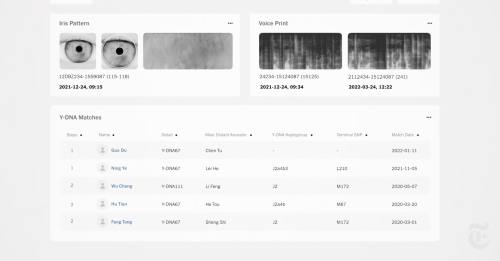
    Where this video surprised me is the scale of biometric data that is now being collected. Iris scans, DNA samples, all of these markers are unique and cannot be altered like a phone number or social media handle. Even more sinister, there is a specific focus on male DNA which is passed on to offspring so the “genetric tracking” continues across generations.

    Iris and DNA samples

    The video is part of a package of material NYT released in what looks to be an on-going investigation and coverage that can be found at:

    www.nytimes.com/spotlight/china-surveillance

  • Native Podcast Players

    Native Podcast Players

    The New York Times app added a native podcast player that does an excellent job of complimenting their news rather than competing with it. The player was launched to support The Daily, their flagship news show.

    What is really interesting about this player is that it lets the user continue to browse while listening. Tap play to listen and then swipe away when you’re done. That’s it.

    What’s great about this is that it keeps you in the NYTimes app and doesn’t send you elsewhere to consume audio. You remain in the NYT experience.

    1. Simple and unobtrusive.
    2. Allows simultaneous browsing and listening.
    3. Continues to play in the background, even if you switch apps or put the phone in your pocket.
    4. Dual platform, iOS and Android
    5. Provides link to subscribe to future episodes in your phone’s default podcast app. It does not try to compete with your existing podcast app.

    The Experience

    When you tap on play, you get a welcome message with simple explanation of how the player works.

    As you’re listening, the player goes grey so as not to visually compete with text of the article. This use case is immediately obvious because you can browse the show notes while reading the article or read the source article while listening to associated podcast (The Daily often features interviews with the authors behind major feature pieces).

    The podcast will continue to play while browsing other stories or checking other apps, it’ll also play in the background after you put your phone in your pocket.

    Audio switches if you listen to another audio app (ie. music app, YouTube). The NYT player saves your place so you can go back to the NYT app and pick up where you left off.

    Swipe left to dismiss.

    Tapping on the player “chicklet” brings up more controls so you pause/play and scrub back and forth or skip forward or backwards 10 seconds. There is also a link to subscribe to the full podcast via your installed podcast app (Apple Podcast app on iOS, RadioPublic Free Podcasts App on Google Play Store on my Android device).

    From the NY Times press release announcing the player,

    The in-app player will allow audio to continue playing even if you navigate away from it, leave the app or put your device to sleep, allowing you to read through related articles and other content while you listen. Audio can be controlled within the app, with the device level controls, or even with an Apple Watch.

    I think the level of integration of the New York Times podcast player is perfect. It’s just enough to extend the story without getting in the way.  All it takes is a tap to play or a swipe to dismiss but there are hooks into a full-fledged podcast app should you want to subscribe or download for late.

    I see more of this and it would be really cool if the NYT Labs could share their code on their Github repository so others can take advantage of what they’ve done and perhaps improve on it.

    Other native players

    Others publishers are adding native players to augment their text stories as well.

  • Back when News was Physical

    Back when News was Physical

    etaoin shrdlu are the first line of letters on a linotype keyboard, arranged based on frequency. The phrase is used to mark the end of a column. It is also the title of a short documentary about the last run of the linotype machines at the New York Times on July 2, 1978.

    There are all sorts of wonderful details in this 30-minute film. We learn the origin of words such as hot type and mattress and are shown how a “pig” of lead is melted down to cast type forms.

    The mechanical crank and whirl of the linotype machines are wonderful sound, especially when contrasted with the castanet-like crackle of the new chicklet keyboards on the the new mainframe terminals shown later in the film. As the 9pm first edition deadline approaches, the “make up men” hunch over their tables side-by-side with page editors physically laying out the paper on full page forms. There’s a wonderful exchange as they figure out how to make the page work, a construction project of words.

    Farewell – ETAOIN SHRDLU – 1978 from Linotype: The Film

    These days are long gone now but I’m glad for this film which captures a technology that was a wonder of its day.

    h/t Open Culture

  • More nytimes.com takeovers

    They’re at it again. Another editorially-obfucating takeover.

    nytimes takeover

  • To Give and Not Receive

    To Give and Not Receive

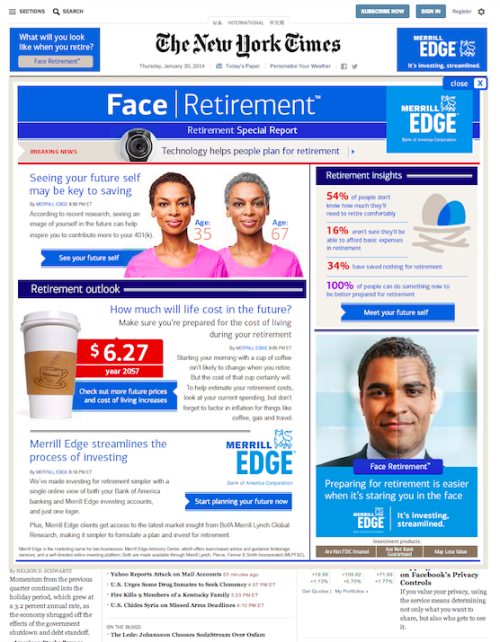
    This afternoon New York Times readers were assaulted by a full page takeover that unfolded across the front page effectively roadblocking the news of the day with a “special report” layout that was both interruptive and offensive. If this is where they are going with their native advertising, I do not like.

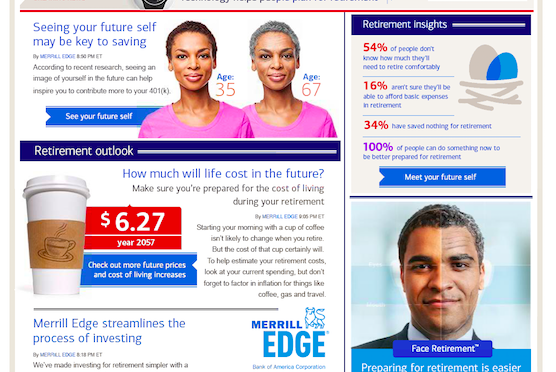
    All publishers need to make a buck and, as someone that works in online publishing, I encourage experimentation but the fact that an institution such as the New York Times would stoop to running such an amateur-looking infomercial hints of desperation. While the Face Retirement campaign is innovative (the landing page asks for access to your computer’s camera so it can take a photo of you and “age” you), there page curl takeover is as old as the hills and takes me back to the Dancing Mortgage Man remnant ads we used to joke about at Yahoo. These ads take more than they give.

    The add was frequency capped so it only ran once per unique visitor but the CPMs must have been pricey. But I can’t help but think that the hundreds of thousands spent by Bank of America to run this ad could have been better spent in other ways. Instead of invading your senses, wouldn’t both the audience, publisher, and advertiser have been better served by underwriting an open house for heavy users of the site? What about granting a free subscription to the paper for three months in return for some personal information that helps you better market your retirement planning services with glossy mailers? There are so many other ways that you can spend $250k, throwing up roadblock banners just seems lazy all around.

    https://twitter.com/ryangonnaryan/status/429047144377372672
    https://twitter.com/Steve_Katz/status/428994284050608128
  • YouTube as a Search Engine

    My son was featured in yesterday’s Sunday New York Times in an article (At First, Funny videos. Now, a Reference Tool) about the unforeseen use of YouTube as a research tool. We all associate videos with entertainment but Tyler has taught me that with the addition of meta-data and micro-chunked content, it’s possible to use YouTube as a rich source of reference material.

    I was contacted by the reporter, who had seen a post on ReadWriteWeb about Tyler’s use of YouTube and wanted to bring the story to the New York Times’ readers.

    My father commented, “It is the inclination of succeeding generations to simplify.” Tyler is on to something. For certain things (contact juggling, macarena, or bugatti vs. fighter jet), YouTube is going to explain things to you better and quicker than plain old text search results. You can sort by not only Relevance and Date Added but also using meta-data from community actions such as Ratings and View Count. Finally, using the example from the article, if you search on platypus, embedded in the results is a pre-defined playlist of over 40 video clips all about the animal.

    Tyler was pleased to see that the article was in the “Bright Ideas” section. His comment about his pose in the photo was that after over 200 photos his head was feeling a little heavy. Strangely, the local newsstand didn’t carry the Sunday Times so we had to go to a Starbucks to get a copy for the photo above and as a keepsake.

  • Another Cool New York Times Hack

    Robert Langman left a comment on my previous post about meta-data at nytimes.com with a link to a couple of cool mashups that use keywords on the older archive of New York Times material, the paper from 1851 through the early 1900’s.

    Check it out here.

  • Open Sourcing the New York Times

    The New York Times has a blog about open source projects and today they shed a little more light on all the wonderful metadata that they make available for folks like Dave Winer to build upon. I sense an open source news hack day coming on.

  • Go on, cheat a little

    Yahoo has joined up with the folks at the New York Times crosswords to promote the new Search Assist feature with a contest. The idea is that you fill the puzzle out successfully and you too can be entered into a drawing for one of five trips to Hawaii. Thing is, this thing is a gimme. Next to each clue is a link to a “Hint” which runs a search in the pane below against Yahoo’s Search Assist which will serve things up for you right there and then. It’s a great way to show off the new Search Assist and may give you a new reason to work on your crosswords with the browser handy.

    I found out about this via a new group on Facebook. Join Yahoo! Pilot if you want to find out about the latest stuff going on at Yahoo! I can’t believe I found something not written up by the folks over at Yahoo! Cool thing of the Day, my usual source for tweaks and trivia about Yahoo – must have caught them asleep at the switch!