
Tag: Wordpress

  • ChatGPT Fun

    ChatGPT Fun

    I went to today’s State of the Word presentation in person (woohoo, so nice to attend in-person events once again!) and one question was about the dreaded “build-to-launch gap” where you build a website for a client and then it takes them months to post anything into the beautiful container you built for them.

    There was some suggestion of using ChatGPT to automatically generate content to fill the gaps. While it’s debatable that a boring prompt will lead to boring text, there is some use in using tools such as ChatGTP to automatically write website copy, the output of prompt with just a little bit of flair can be quite inspirations.

    While sitting there listening to the question and answer, I fired up ChatGPT and had the AI write something before my eyes. I unfortunately have only a screenshot of the first attempt which I showed to the amazement of the person sitting next to me as we saw the thing get typed up in real time.
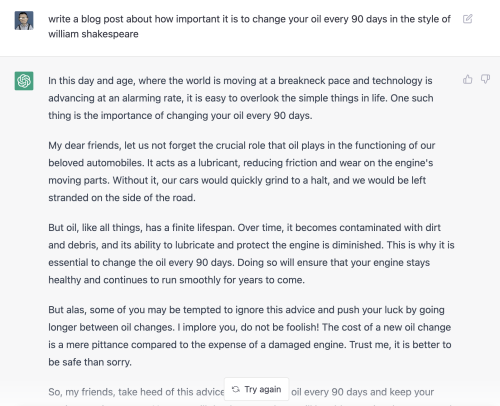
    Just to try and re-create the scene so you could see how quickly it worked, I did it two more times. The first time it changed gears with the same prompt and wrote a sonnet about why you need to change your oil.

    The Prompt: Write a blog post about how important it is to change your oil every 3000 miles in the style of William Shakespeare

    Lend me your ears, fair readers, for I come bearing news of utmost importance. ‘Tis a tale of lubrication and maintenance, of the crucial role played by a humble substance in the wellbeing of your trusty steed.

    I speak, of course, of oil – that most vital of fluids, without which the inner workings of your car would grind to a halt and your journeys would come to a swift and unfortunate end. And yet, despite its importance, it is a substance too often ignored and neglected.

    Forsooth, I implore you – do not make the mistake of believing that oil needs changing only when your car begins to show signs of distress. Nay, ’tis a task that must be performed regularly, with the utmost diligence and care. The recommended interval, you ask? Why, every 3000 miles, without fail.

    Some may claim that this is an unnecessary expense, or that modern cars require less frequent oil changes. But I say unto you – the cost of a simple oil change pales in comparison to the expense of repairing the damage caused by neglecting this vital task.

    Think of it thus: the oil in your car is like the lifeblood that courses through the veins of a living being. It keeps all of the moving parts functioning smoothly, preventing friction and wear. Over time, however, this oil becomes contaminated and degraded, losing its ability to do its job effectively.

    When this happens, the various components of your car are left to fend for themselves, rubbing and grinding against one another with no protective barrier. The result? Reduced performance, decreased fuel efficiency, and a heightened risk of costly and inconvenient breakdowns.

    But fear not, dear reader, for all is not lost. By changing your oil every 3000 miles, you can ensure that your car is always running at its best. It may seem like a small and insignificant task, but trust me when I say that it can make all the difference.

    So take heed, and do not neglect this most essential of maintenance tasks. Your car will thank you, and you can rest easy knowing that you have done all that you can to keep it running smoothly.

    Related: I live-blogged this year’s State of the Word on my old tumblr account just for giggles

  • Distribution without tears

    Written somewhere over Kansas on the way to WordCamp for Publishers. Please look me up if you want to chat about this post.

    This is a shameless pitch for a plugin to WordPress my company just published but there are also broader ideas proposed here and I would love your feedback.

    SmartNews is a mobile news aggregation app. The backend tech is pretty nifty. It uses machine learning and what we call a “discovery algorithm” to expose users to new points of view that they might not see if they are using a social network or personalized news service to read their news. You can read more about that stuff here, that’s not what this blog post is about.

    SmartNews aggregates news from our partners. If we have no news, we have nothing for our users to read. While it’s possible to crawl the web and pull in stories as we find them on the open web, we would prefer a relationship with each of our publishing partners so they send us their articles and feel in control of how their content is used by SmartNews. We want our partners to feel as if the SmartNews app is an extension of their CMS. If our partners are not successful, neither will SmartNews.

    While we do send traffic to our publishers (lots of it) that’s not the only benefit we offer. We have architected the product to offer a snappier, native view (think of Safari or Chrome’s reader mode) of the articles. Because this view is hosted on our app, our users can read while offline. The SmartView page in SmartNews was designed to serve the subway commuter in Tokyo where signals were spotty.

    But we wanted to make sure publishers had a benefit when readers chose to read their articles via the SmartView page. Thus the SmartFormat feed spec was born. SmartFormat is a simple variant of the RSS standard with a couple new elements to provide greater portability of not only a publisher’s articles but also their advertising and analytics.

    The <snf:advertisement> element lets publishers provide an ad tag which we run on the SmartView page. Because this is the publisher’s ad tag, the publisher keeps 100% of the revenue.

    The <snf:analytics> element lets the publisher send along the analytics bug so they can include SmartView pageviews in the total pageviews that they see on their dashboard.

    Combined, both the <snf:advertisment> and <snf:analytics> allow for portability of not only content but also advertising. Now when a publisher distributes a full text feed to SmartNews they also are distributing the monetization and analtyics footprint as well. While other platforms require you to opt in to revenue shares on the platform’s advertising and analytics, SmartNews lets you use and optimize your own, dynamically, on a feed endpoint you control.

    Now to the fun part. If you’re running on WordPress, we have a simple plugin that will open up two text boxes, one for and one for and will build a SmartFormat feed compliant with the SmartFormat feed spec. In order to get distribution on SmartNews, all you have to do is apply to be a publisher on SmartNews, install the plug-in, then you’re ready to go!

    Settings page of SmartNews SmartFormat plugin

    As for the broader proposal, I was curious (and I could very well be looking in the wrong places) why no one has attempted to extend RSS in this way before? Feedburner had something where they injected Google Ads into their RSS feeds but it never really took off because those ads only ran in the feed or feedreader, not on the downstream aggregation sites or platforms. As much as I am loath to try and extend a standard, wouldn’t it benefit publishers to have a place where they can add their ad tag, analytics scripts, and even subscription CTAs so that the business travels along with the editorial?

    <snf:advertisement> and <snf:analytics> work great for SmartNews but what about extending it for others? The more platforms that accept this extended feed, the more incentive there is for publishers to create these feeds. Seems like the classic win-win all around. Besides the bureaucratic lift of trying to extend a “standard” such as RSS am I missing something?

    NOTE: The SmartFormat plugin for WordPress is available for download on wordpress.org.

    Thanks to @MrYhira for the inspiration for this plugin.

  • WordPress 4.4 Embed test

    Just upgraded everwas.com to WordPress 4.4. Let’s see how the embed feature works.

    WordPress 4.4 “Clifford”

    Nifty!

  • Now Running WordPress 3.6, Oscar


    Each major version of WordPress is named after a jazz musician. WordPress 3.6 is named after “Oscar” in honor of the great jazz pianist Oscar Peterson. Performance is good. Along with an upgrade of my Thesis theme to 2.1, it’s pretty snappy!

    sitespeed
    Site Speed recorded by Google Analytics.

  • Wagging your Long Tail with Just for You

    What if you could ask each reader that came to your blog what they were interested in and show them a list of posts from your archives that matched those interests? I’ve been blogging for over five years and as posts roll off the front page they fade into the archives to be mostly forgotten,.

    Today MyBlogLog published a WordPress plug-in that grew out of a concept that I’ve been playing around with for the past year. Forget contextual matching for relevance and targeting, what if you could match against someone’s stated interests? Blow past trying to parse out meaning from the other text floating around on the current page and reach through the glass and query against the tags that people attach to their MyBlogLog profile. Target the Reader, not the Page. It’s a vision of programming that says, “OK, now that you’re here on this site, did you know there was a series of articles this author wrote about your passion for Harley Davidson motorcycles last year?”

    Marshall Kirkpatrick of ReadWriteWeb writes,

    There are countless companies that have raised millions in venture capital to offer publishers recommendation systems for their readers – commercial publishers pay big money for this functionality. Now bloggers can have the same type of thing for free

    The Just for You plug-in works with hosted WordPress and, once installed, looks at each visitor to your site to see if they are a MyBlogLog user. If they are, the plug-in looks up the tags on that user’s profile and searches through your blog’s archives and presents a list of headlines pointing to posts that match those tags in a widget that runs in your blog’s sidebar. For more details and sample screenshots, see my post on the MyBlogLog Blog.

    If you look to the right, the Just for You widget is right there, five headlines fresh from my Archives for your reading pleasure. If you’re a MyBlogLog user, let me know in the comments if they match the tags on your profile. If you’re not a MyBlogLog member, what you see is a collection of headlines based on the the tags of the most recent MyBlogLog visitors to the site so hopefully there’s some connection to why you’re there as well. Either way, I’m interested in your thoughts.

  • Doh! Comments Deleted

    Chalk this one up to user error.

    You should never try and de-spam your blog after a night out on the town. I was a bit frisky on the controls and the AJAX-y WordPress UI flipped from showing comments awaiting moderation to comments approved before I could stop myself from clicking, Delete All. I think I lost about 14 comments

    I tried to get a back up but it’s turning to be more of a pain than it’s worth and I need to move on. To those that got wiped – Sorry!

  • A picture is worth a thousand words – Yahoo! Shortcuts for WordPress

    Yahoo ShortcutsWhen I write a blog post I make heavy use of the tabs in my browser so that I can switch back and forth between the blog compose screen and other screens where I do my research. I usually have my trusty image editor running as well so I can crop an edit any images that I use in my posts.

    For the past few weeks I’ve been playing around with a new WordPress plug-in (Yahoo Shortcuts) that will cut back on the copy-paste, rightclick-save, and other context switching by bringing content and references directly into the WordPress compose area. With this plug-in running, it scans your post for potential annotations that can turn a drab bit of hypertexed links into a gloriously illustrated work of art.

    For example, if I wanted to do a story about my hotel in where I recently stayed, all I need to do is include the address (3000 Paradise Road, Las Vegas, NV 89109) and Shortcuts will look for suitable information such as the map you see on this post and add it complete with text wrapping. All it took was a single click. Not only will Shortcuts search across shopping for product information, it can also pull in stock charts for companies, and Creative Commons images from flickr. The embeded graphics are beautiful so the temptation is to go overboard and embed the Shortcut “badges” willy-nilly. An alternative is to chose the “link” option which is a great way to add context to your post while keeping your viewers on your site.

    Some other examples where Shortcuts does the right thing. Hover over the link to view the contextual badge:

    • A chart for Dow Jones or (AAPL).
    • Shopping preview for the Nintendo Wii
    • A search preview for Barak Obama

    Once you’re done with your post, click the Review this Post button and you get a preview window where you can choose which links you want to embed, which you want to just enable with a popup, and which ones you want to ignore. This is key. Other products that automatically provide contextual links are an all or nothing affair. It’s vital to retain editorial control so you can choose which words or phrases you want to recognize. Yahoo Shortcuts does this. To get a sense of the how the plug-in works, check out the screencast.

    No more tabbing over to another window or fiddling around with HTML or CSS code, Yahoo Shortcuts just brings it all in so you can work with it right there and then, all on one page.

    Yahoo! Shortcuts plug-in for WordPress