Tag: search

  • White-label AI Bots

    White-label AI Bots

    I’ve been playing around with a hosted Chat AI offered by Chat Thing that was recently announced on Product Hunt. Seth Godin has indexed 5M words from his blog [Seth’s Blog bot] and Dave Winer uploaded his 30+ years of daily posts from scripting.com [Scripting News bot]. Both bots are instructive and give you a real-world example of how these bots can be used to leverage your readers to pull up and share “observational snippets” gleaned from the archives. I decided to play.

    Here are some screenshots. You can see from the responses that it really is a new way to search. Here I ask the bot how Seth Godin, a marketing genius, would run a presidential campaign.

    Transcript from Seth’s Blog bot

    Here is the post the bot is referring (it would be nice if it provided a link as a footnote). Incidentally, searching on Seth’s blog for “presidential campaigns” yields a different result that may be tangentially relevant but not as specific a response as what came back from the bot.

    On the Scripting News bot, I compared what the OpenAI Chat GPT bot knew to his white-labeled bot to see if I could find out Dave’s favorite basketball team.

    OpenAI really had no clue. I know that scripting.com was used as training material from the WaPo story but apparently it hadn’t retained any particular tidbit of knowledge about his basketball preferences.
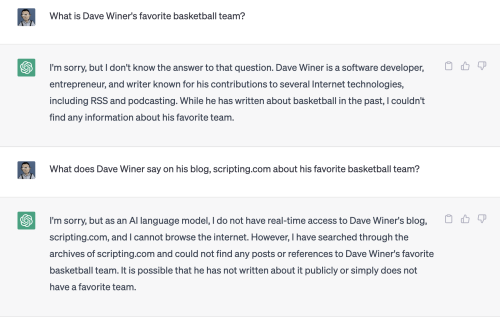
    Transcript from ChatGPT at OpenAI

    Over on the Scripting News bot I had a much richer exchange. Chat Thing uses Open AI as the backend but they’ve figured out how to “focus” it to the data added to the index, in this case, all of scripting.com.
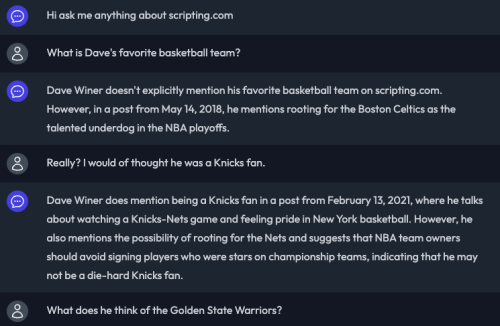
    Transcript of conversation with Scripting News bot

    Again, it would be great if it linked directly to the source articles. I’ve put that in as a feature request on Chat Things’ Discord Server.

    It’s still a bit buggy yet (sometimes it echos back an earlier response, like a broken record) but the team is moving fast and adding new features almost daily.

    Two weeks ago you had to export your archives and convert them to Markdown before you could upload them to get indexed. Today they announced that you can add your site to be crawled and add your RSS feed to keep the index fresh.

    Chat Thing data connection sources

    As of today, the RSS feed link just pulls in links off your RSS feed. Hopefully they’ll get more precise in the future and let you upload just the relevant sections of your feed or use an API to add specific tables in a database. It would be nice to have more control over what gets indexed into the training set.

    As Seth says, “You’ll have no trouble tricking it” and we all know how generative AIs hallucinate; there are a lot of kinks to be worked out but these early experiments offer up an entirely new way to unlock the value of archives that we haven’t seen since the early days of search.


  • Technology fades into the background

    At this year’s Google I/O developer conference, CEO Sundar Pichai spoke of how augmented reality (AR) glasses embedded with Google’s real-time translation services could break down the language barrier in face-to-face communication. While not explicitly announcing any hardware, he did show a video with a pair of glasses with a heads-up display that would show the results of Google’s real-time translation technology as “subtitles for the world.”

    Google Translate + AR Glasses = Subtitles for the World

    Taking another run at the ill-fated Google Glass vision is a game-changer and speaks to the maturity and deep pockets of Google as a corporation. Taking lessons learned from Google Glass 1.0 the company has improved the technology to a point where it’s less interruptive (and doesn’t make you look like a cyborg) and ready for more widespread adoption.

    We are tiptoeing into the post-computer world where “technology fades into the background” and allows us to push away the unnatural hardware interfaces and interruptive notifications from the human-to-human interaction and realize the true vision of AR – to augment the world around you.

    Combine this “subtitles for the world” mentality to another Google Lens enhancement, Scene Exploration and now you have useful metadata from Google’s Knowledge Graph overlayed on the world around you. Check out the video below which jumps to the demo of how Google envisions you can use Scene Exploration to learn about the contents of items on the shelf at the grocery store.

    Google Scene Exporation demo at 7:00

    Exciting times! Caveat is, as with all real-world technology, things will be rough in the beginning. I work in a Japanese company and sometime we turn on the real-time translation AI in Google Hangouts to see if we can get a decent translation of the meeting. Let me just say the results are not quite there yet. As Pichai said, there’s a lot of work to do.

    The competition has not stood still either. We also have Facebook’s Smart Glasses focused, as you would expect, on the capture and sharing features with a light that goes on to warn you if someone is filming. Snapchat’s Spectacles (pictured below) overlay 3D filters over what you look at thru their glasses bring the Snapchat Lens experience to the world around you, leave the psychedelics at home. The future is here, we just need to improve the software.

    Snapchat Spectacles 3

  • Gigaom Search & Alerts

    I never got around to writing about the Search and Alerts products I worked on while at Gigaom. Using native WordPress features and extending it just a bit, we were able to build a full-fledged faceted search engine and notification platform at a fraction of the cost of what it cost to do when I was at Factiva.

    search.gigaom.com pulled in content from across gigaom.com, research.gigaom.com, and events.gigaom.com and presented results in a way that allowed you to filter by tags and explore relationships between tags applied on to the content. Built in was a well structured taxonomy and basics smarts which would map a keyword to the appropriate tag.

    Gigaom Alerts solves a different problem. While search allows you to search back in time through the archives (which at Gigaom were a significant portion of their total traffic), Alerts let’s you, in a sense, look forward. One of the problems of a media site is that it is often not a destination. Visits come by way of an app or aggregator so the challenge is getting your readers to return. Newsletters are one way but we are experiencing a proliferation of newsletters competing for readers’ attention.

    Alerts was built as a way to store a standing query which would deliver notification if and only if there was new content which matched that query. Results are highly relevant because the alerts are constructed by those who read them. If you explicitly state your interest in “Nest” or “Tony Fadell” then there is a high likelihood that you will click thru on a notification of new articles about those topics. Indeed, we did see high engagement from readers that came in via Gigaom Alerts, they stayed on the site longer and read significantly more pages per session the our average readers.

    Gigaom Alerts leverages the native WordPress post-taxonomy architecture so that you can have scale to a large number of individual alerts without a significant cost.

    1. Each saved alert is a post
    2. The terms for the alert are taxonomy terms on the post
    3. The author of the post is the user to be alerted

    WordPress VIP kindly archived a talk that Casey Bisson did at one of their meetups which I’ll share here along with a link to the slides.

    Hat tip to the folks at Followistic.com who let me know that Casey’s session was posted. If Gigaom Alerts sounds interesting to you, I’d check them out. They have built a plug-in which works much the same and is super-easy to install if you’re running WordPress.

  • Pinterest is a Database of Human Intentions

    If you pin something to a board, the name of that board is a string and that string by definition describes it. Someone else pins the same thing to another board. And on and on. One board says shirts, one says ikat, one says gifts for my wife, one says red things. And most pins are on thousands and thousands of boards. So there are thousands of human-generated strings that describe each of these objects. These are descriptions that are very meaningful to the people who created them. It’s not someone trying to make a machine smarter. And we think it will make a machine smarter because it will solve a human problem.

    What is Pinterest? A Database of Intentions

    And later, on NPR’s Fresh Air, Alexis Madrigal, the author of the post above, expands on what Pinterest can do with these “strings used to describe objects”

    By letting people copy and label images, Pinterest created this rich database of persons, places and things. And it is just beginning to use that data to help people find stuff. With a programming team that’s largely been hired away from Google, Pinterest has begun offering what it calls “guided search.”

    Pinterest co-founder Evan Sharp told me that guided search helps you find things you didn’t know that you were looking for. If Google is great when you know exactly what you want, Pinterest can help you figure out what you want. As you search, Pinterest will suggest tags that you could add to help narrow your query. Search for hats on Pinterest and you might get “fedora” or “baseball” or “church lady” as suggestions.

    Back in 2003, John Battelle was blogging about The Database of Intentions as, “The aggregate results of every search ever entered, every result list ever tendered, and every path taken as a result” as an artifact of created by our interactions with search indexes creating, “a massive database of desires, needs, wants, and likes” of all humankind.

    Back in 2003, the database was still made up of links manually added and clicks manually clicked. Today, screen-scrapers, bots, and click-farms automate much of what used to be a human activity. So much so that the human intent is lost.

    So much so that Pinterest’s competitive advantage is to put the human back into discovery.

  • David Segal on Search

    David Segal, the same New York Times journalist who filed the fascinating 5,500+ word piece in November about decormyeyes.com is back again. The Dirty Little Secrets of Search with a great piece looking into an unwitting, client (and now victim) of black hat SEO, JC Penney. His piece goes into quite a bit of detail (for a mainstream newspaper anyway) on the underground mechanics of the link sharing economy but what I like best is the following description.

    When you read the enormous list of sites with Penney links, the landscape of the Internet acquires a whole new topography. It starts to seem like a city with a few familiar, well-kept buildings, surrounded by millions of hovels kept upright for no purpose other than the ads that are painted on their walls.

    Exploiting those hovels for links is a Google no-no. The company’s guidelines warn against using tricks to improve search engine rankings, including what it refers to as “link schemes.” The penalty for getting caught is a pair of virtual concrete shoes: the company sinks in Google’s results.

    Sounds like a rough neighborhood.

  • Using Wordle to Visualize Keyword Traffic

    Using Wordle to Visualize Keyword Traffic

    On Avinash’s excellent Ten Steps to Love & Success post on Web Data Analysis he writes about using the keyword tag cloud visualization tool Wordle to visualize search terms used to reach your site. Below is a visualization that I made in representing the top 500 phrases which were used to discover this site over the past three years.

    Click for full size image

    It took me only a few minutes to make this image. All you need is Google Analytics running on your site, Excel or other spreadsheet software, a text editor, and access to wordle.net. Here’s what you do:

    1. In Google Analytics, take a look at the Traffic Sources > Keywords report. By default it will show you the top 10 search terms from the past month. Change this to the top 500 and extend the date range to the maximum history of your blog.
    2. Click Export up top and export the data as a CSV file. If you have Excel, use it to strip out the extra columns and rows. You only need the Keywords and number of times used. Strip away everything else. Save what’s left as a csv file that you can open in your text editor (*.txt).
    3. Open the file you just saved in your text editor and replace the “,” on each row with a colon “:”
    4. Open your browser to the advanced tab on wordle.net.
    5. Copy the keyword rows from your text editor and paste them into the weighted words or phrases box on the wordle.net site (the first box).
    6. Click Go and visualize

    You can fiddle around with the fonts, color and layout until you get an image you like. Share in the comments links to your own creations.

  • Fun with Google Social Search

    Google Social Search is now available in Google Labs. Danny Sullivan has the most in-depth coverage out there but it’s worth turning on yourself because you’re going to be the best judge of how well this feature performs for you.

    Be sure to dig deeper than the default two results Google throws timidly down at the bottom of your search results. Click Show Options and click on the Social category in your sidebar. Check out the results you get for People and you’ll get a feel for the power of this feature.

    You have the full index of Google quickly filtered by names that should be familiar to you. In a stroke of genius, Google has re-labeled this extended network your, “social circle” which a much better label than “friends” (which didn’t sound right) or “social graph” which no one really understood.

    The screenshot above is my aha moment – I had no idea that Caterina ever was in Finland and certainly didn’t know that she took the time to blog about suggestions of things to do in Helsinki. This is a post from 2003 which most certainly have been lost to the sands of time if it were not for this feature which surfaced this gem in just a few clicks.

    And now for a feature request. As you can see, this is a great feature for retrospective searches which makes the foggy past plainly visible.  What about adding an RSS subscribe option so that you could apply these searches to the prospective future?

    It would be great to know when any of my extended social circle also wrote about my adopted hometown. I suppose it would be easy enough to script something but why not build it in?

  • Real-time Search, Art or Science?

    Erik Schonfeld at TechCrunch posted a thought-provoking piece on real-time search. Twitter and Facebook are falling over each other in the media spotlight, fighting to be the place to go to find out the now.

    There is something about human nature which makes us want to prioritize information by how recent it is, and that is the fundamental appeal of real time search. The difference between real time search and regular search didn’t really crystallize for me until I had a conversation with Edo Segal, who sold his real time search company Relegence to AOL a few years ago and holds three patents on the subject. “Real time taps into consciousness,” says Segal, “search taps into memory. That is why it so potent. You experience the world in real time.”

    Like a moth to the flame, we are drawn in by the seductiveness of the freshest information but when we get too much of it, we’re overwhelmed with the banality of everything by everybody at the same time. It’s like listening to 1,000 CDs at once – perfect resolution saturates the senses.

    What we really want is a way to zero in on the patterns that matter. Like the proverbial early bird, when you get fresh information that’s relevant and actionable, you can go further and faster on less. Back in start-up land I would use all my alerting tools to jump on new technologies that I knew would get buzz so that we could piggy-back on their eventual coverage. Just the other day, I noticed that Marshall Kirkpatrick was trolling for ideas and I jumped on that and was rewarded with a mention in his story about Augmented Reality.

    How do you monitor the hourly hum and look for emerging patterns before they become obvious? That problem is as old as the weather forecaster looking for hurricanes or the stock broker parsing the wires for tips.

    When does gossip become news? In the financial industry you need to strike the right balance between moving on privilaged information. If only a few people know something, it’s not going to move a stock – it has to be common knowledge in order for the masses to place their bets.

    I used to sell financial news wire subscriptions in Tokyo to equity traders and there was one broker that wouldn’t replace her Reuters subscription with one from Dow Jones even after I showed her several examples where DJ beat Reuters on market moving news. In Tokyo DJ was an underdog so it was a tough sell. She wouldn’t budge, insisting that she needed to see the same news others in the market. She didn’t want to have to think and weigh each piece of news, she looked at her quote screen and would use jumps in price to draw her to the news feed. It was a cleaner signal, albeit a commodity.

    Finding relevant emerging patterns before they become trends, that is the challenge. I’ve said it before, better filters will be the next great algorithm war. We’ve all become enamored with twitter search which we all know is imperfect and self-selecting but compelling nonetheless.  I think we’ll also find that getting real-time alerting right on a broader scale is going to be more art and less science.

  • Spokeo Repositioned as a Snitch

    While it may be technically true, I’m not a big fan of Spokeo’s new positioning.

    Uncover personal photos, videos, and secrets. . . GUARANTEED
    Uncover personal photos, videos, and secrets. . . GUARANTEED