Tag: web & tech

  • VGA on a Cellphone

    vod904sh.jpgFollowing on my previous post on Tivo on the cellphone, if you’re going to do it, you’ll want one of these phones. True VGA on a phone has four times the resolution of the best screens out there as well as some other goodies:

    It offers a range of advanced features such as a 3.2 megapixel camera; a Motion Control Sensor (for playing 3D games), and a Face Recognition function that authenticates handset owners by sensing their facial characteristics.

    Another interesting feature is the ability to indulge in instant messaging with those in close proximity to you using Bluetooth.

    Love the IM over Bluetooth!

  • Create your first head with GenHead

    genhead.JPG

    Check out this tutorial on how to create a 3D head from two 2D photos. I never knew playing God was so easy. The company, Genemation, is also working on a new version of their GenCrowd software to generate, “thousands of synthetic copyright free photo-realistic heads by age, gender and ethnicity.” Something to do on the 7th day.

  • Long Live the Aibo!

    aibo.jpg We are sad to hear news that Sony, in a cost-cutting measure, is shuttering the robotics division famous for the production of the Aibo robotic dog. They were a little pricey at $2,000 a pop but they were really sophisticated and quite ahead of their time. Sony provided a SDK which could be used to program emotions and face recognition software allowed the dog to respond to it’s owners.

    We also will never get the chance to see 60 Aibo dogs dancing in unison to the Bee Gees. (6.6MB wmv file)

  • Sony Reader shown at CES

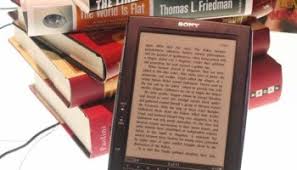
    Sony Reader

    Gizmodo has coverage of a new reader from Sony based on technology licensed from eInk Corporation based up in Boston. Sony had launched an earlier version of this product, the Libre, in the Japanese market but it apparently never took off because of it’s restrictive DRM technology. Since I have to drive to work I’m no longer in the market for such a device but anyone that takes public transportation and finds themselves reading lots of printouts, a device like this could be a godsend.

    While the device supports RSS, PDFs, JPEGs, and MP3 files (which, on the Sony site, they take pains to point out are unencrypted), it does not support WiFi and requires the separate purchase of a cradle which you hook up to your PC to transfer files.

  • Wi- Fi enabled LCD Picture Frame

    estarling_frame.jpg

    I’ve always been a big fan of ambient displays of information as a non-intrusive way of keeping up with the river of information that flows through our lives. Screensavers and scrolling images are one method which shows promise and in our new broadband, always-on world. PointCast was popular because people liked the concept but it was killed by IT departments because it was a bandwidth hog when bandwidth was still scarce.

    eStarling makes an LCD screen that, once programmed via its USB port, can update itself via Wi-Fi. It accepts images from email or a Flickr RSS feed. The memory holds up to 30 pictures that are cycled through until new photos replace the older ones.

    Some uses:

    • Give one to the grandparents and set up an email account for the device. Have the family email the lastest photos of the kids. You can configure trusted email accounts to keep photos of viagra bottles from making it into rotation.
    • Search a tag or group you like on Flickr, (ie. clouds or squared circle) and have the photo frame subscribe to the latest images.

    Available on ThinkGeek. Thanks to Niall for the pointer.

    UPDATE: Niall points to a similar device that boasts a larger screen and can connect to other PCs on a home network.

  • The Sounds of the Ocean

    We’re eating breakfast and getting in the mood for the seashore. It helps to listen to the Monterey Bay Aquarium webcam with the sound turned on. If you plug it into your stereo and turn it up loud, you can hear the harbor seals.

  • Vertigo on the flatscreen

    We all got a kick out of Google’s satellite view and enjoyed zooming around with Google Earth. This week Microsoft launches their local.live.com service with it’s cool Bird’s Eye views of landmarks like the Golden Gate Bridge.

    But if you really want to knock your socks off, you have got to try Big Eye in the Sky Quicktime VR site. Photographer Ed Fink has taken 360 degree views from a helicopter and the results are stunning.

  • The $100 laptop

    The MIT Media Lab has released photos of its $100 laptop designed for children in developing nations. It features a handcrank for back up power in rural areas, wireless access via a peer-to-peer mesh technology, and (much to the disappointment of Appple & Microsoft) runs Linux.

    From the FAQs:

    Why do children in developing nations need laptops?
    Laptops are both a window and a tool: a window into the world and a tool with which to think. They are a wonderful way for all children to “learn learning” through independent interaction and exploration.

    Why is it important for each child to have a computer? What’s wrong with community-access centers?
    One does not think of community pencils—kids have their own. They are tools to think with, sufficiently inexpensive to be used for work and play, drawing, writing, and mathematics. A computer can be the same, but far more powerful. Furthermore, there are many reasons it is important for a child to “own” something—like a football, doll, or book—not the least of which being that these belongings will be well-maintained through love and care.

    Initial orders are being negotiatiated with Brazil, Thailand, Egypt and Nigeria with each government purchasing at least 1 million units each. They are expected to start production early next year.

  • Mike Torres and his gadgets

    While some of us talk about the upcoming convergence of television, PCs, and mobile, Mike Torres (Lead Program Manager for MSN Spaces) is living it. Right on Mike for blazing the trail!