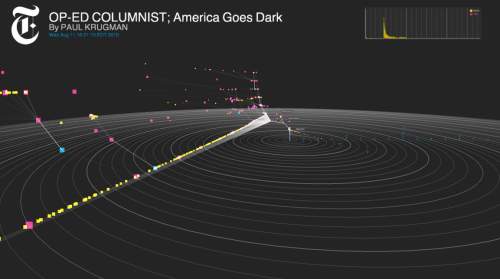
The New York Times R & D group (nytlabs) has a sexy demo video up on their site showing off a new tool they are using to visualize how their content is amplifed and shared via the Social Web. In their words:
This first-of-its-kind tool links browsing behavior on a site to sharing activity to construct a detailed picture of how information propagates through the social media space. While initially applied to New York Times stories and information, the tool and its underlying logic may be applied to any publisher or brand interested in understanding how its messages are shared.
Hit the mini-site for Cascade and check out the video. It would be great to learn more about the nuts and bolts of how Cascade works. The video only mentions twitter and bit.ly but I’m sure there’s more.
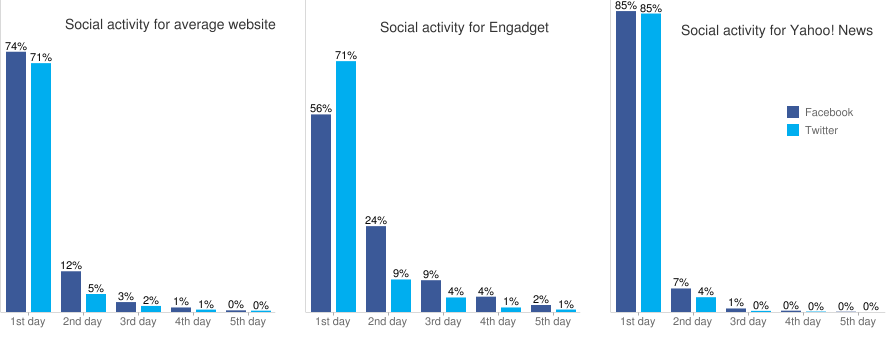
The money shot from yesterday’s Yahoo Research’s Like Log study is the social activity graph below showing how this activity drops off a cliff after the first 24 hours.
Looking at over 100,000 articles across 45 big media sites over the course of three months, Yahoo researcher Yury Lifshits found that a vast majority of the Facebook Like and Twitter Retweet activity. Broadly, 80% or more of the activity takes place during the first 24 hours following the posting of a story. No surprise here, News is about New.
The conclusion from Yury makes is that sites that put out more than one story a day actually run the risk of splitting their traffic if they can’t double it. Each additional story/day diminishes the return and may contribute to burnout of your audience. This runs counter to the leaked AOL way memo pushing for quantity over quality.
Gawker Revisits the Front Page
Gawker famously underwent a redesign that reinforces the conclusions made by the Yahoo research. Look at the redesign before and after and you can plainly see. The image below is their traditional “blog” output which presents the latest story at the top with newer stories pushing the older ones down the page. The default Popular Now column on the right gives some counter-weight but otherwise it’s the standard, reverse chronological layout.
Gawker.com Old View
Now contrast this with their new look below. Notice how much more emphasis is placed on the images. This view is called their “Top Stories” view and they’ve taken away all timestamps on the stories as that is not the point of how things are laid out. This layout has an editorial touch to it, the Gawker editors are putting stories in front of you they want you to see.
We need a few breakout stories each day. We will push those on the front page. And these exclusives can be augmented by dozens or hundreds of short items to provide — at low cost — comprehensiveness and fodder for the commentariat. These will typically run inside, linked by headlines from the blog column, so the volume doesn’t overwhelm our strongest stories.
and later,
A prominent “splash” slot on the home page — taking up the two-thirds of the page — can promote the most compelling gossip and scandal. But it also provides the opportunity to display our full editorial spectrum. The front page is our branding opportunity. It’s a rebranding opportunity, too, a way to demonstrate intelligence, taste and — yes, snicker away! — even beauty.
Back when I was selling the idea of blogs to media companies, I remember saying to them that the front page is dead and that people were coming in the side door to their sites via shared links and pointers from the search engines. This was why it was important for them to make sure each page could stand on it’s own as its own front page for their business.
It seems as we have come full circle with the larger blog sites now focused back on the front page, picking favorites to be their star headline stories for the day. Are we giving up on social mediation to solve the information filtering problem? Are we going back to a world where we start each day with a collection of bookmarked top sites we visit daily? Are we going back to appointment television? Do we abandon the firehose feed and stick to just the top stories?
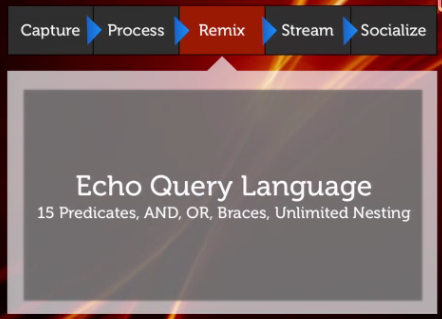
I tuned into the launch of Echo’s social media mixer, the StreamServer, which they describe as a platform for the activity streams-based economy. As the saying goes, in a world where the amount of information is ever-expanding and time remains constant, attention is what is of value. As your phone and computer beeps and buzzes with the latest urgent notification, the ability to monitor, much less take action on a signal becomes impossible. All information is approaching real-time in the constant battle to be first.
The volume of this “me first” wave of data increases causing the half-life of information to get shorter. Steve Rubel quoted a study that found that 92% of retweets happen in the first hour. If you can’t get your point across so that it resonates with someone else within that first hour, that thought is gone for good. Scrolled away, below the fold, decayed away.
So we wire things up to make things faster and we put systems in place to help us make sense of all this information flowing around so we can pick up a signal that we can use in a meaningful way. Something that will hopefully make our life better than it was before we had to deal with all this information that gets pushed at us.
Then we build filters. And what are filters but a search query that swims mid-stream. Not a respective search like what you would type into Google to search an archive but a prospective search, one that looks forward in time. And each of these queries we type are nuggets of intelligence. We fine-tune them to get exactly what we want and filter out what we don’t.
Follow all my LinkedIn contacts (that have twitter accounts) that are in the Mobile Phone industry and have over 500 followers that are saying anything with a hashtag of #MWC and has more than 5 retweets.
In plain English (kinda), that is what we want our filter to do and a smart system will look at how we respond to the results of that filter and try and automatically make it better. More like this, less like that, etc.
So we teach the machine how to think. We tell it how we connect the dots and draw conclusions.
So I dig around the aboutecho.com wiki and scroll down to the Philosophies section (I dunno, sounds intriguing) and click through to read this post on http://synapticweb.org/.
Social profiles are becoming real-timestreams. If the old profile was a neuron, the stream is a neural pathway or pattern. It is the connective tissue between applications and people that feeds information from one node to another. Profiles come and go, people express themselves using countless tools and technologies – the stream, however, is the consistent and persistent channel that matters. It is the new presentation metaphor that increases the level of information we can consume while reducing our sense of overload. Just like synapses, they fire, and like synapses, it is the collective patterns of multiple firings – multiple signals or re-tweets – that creates a pattern. Patterns create meaning. Tune in, tune out, it doesn’t matter. The information will find you if it matters. Implicit information derived from content and gestures is one of the great opportunities of the Synaptic Web. To observe a set of gestures and connect them together creates a dynamic profile of interests, intentions and friends that can be used for discovery and filtering.
This is heady stuff. Yeah, I read Kevin Kelly’s book too but we’re going to have to evolve quite a bit beyond brute force keyword filters. How do you encode a vibe, a hunch?
Don’t get me wrong, Echo StreamServer looks like an interesting idea and I’m sure we’ll hear something along these lines from Facebook soon too. Big minds are at work on this. But let us not fool ourselves into thinking that a bit of hacking is going to solve our information overload problems. We’re just taking the tools out of the toolbox and learning what we have.
Last night I watched the 2011 State of the Union address, conveniently streaming it via YouTube in 720p over the home wifi and out to my flatscreen Samsung TV here in Finland. I found the archive easily enough and noticed that the White House had conveniently split the screen to show helpful infographics on the right synced up with what was being said by President Obama on the left.
We are now officially a PowerPoint nation. Simple talking is no longer enough to engage us.
I’ve always voted democrat and am generally support the President but always take a grain of salt with any spoon-fed messages such as the one above (why is the kid on the right jumping for joy? Is it the tax cut?). There are other ways to look a the speech and the Vox project over at Rutgers is an interesting one.
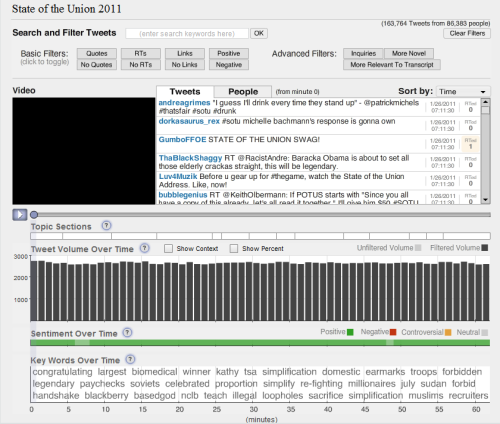
Vox Event Analytics takes a look at the speech and syncs up a filtered tweet feed based on keywords and hashtags and then plays those back in the right margin while you view the speech. Along with this synchronized playback is also a playback of the tweet volume, keyword analysis, and sentiment of tweets over time. Vox, as the name implies, tries to reflect the reaction of the people (as reflected through their tweets) and it’s interesting to see what’s being said as the speech is going on.
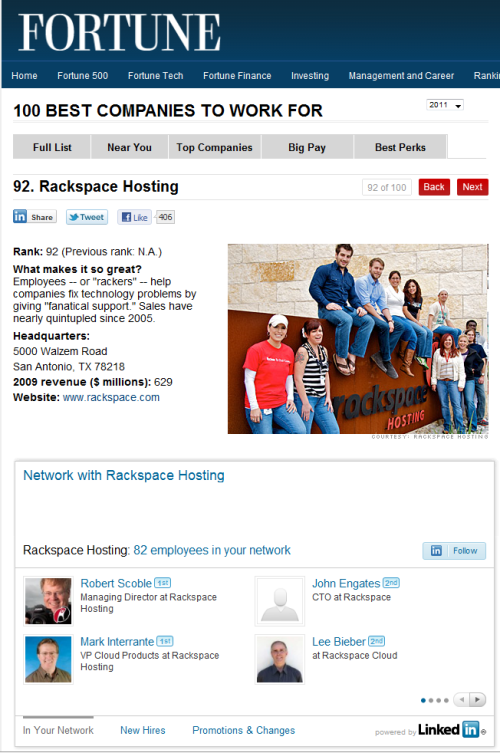
Congratulations to whomever is turning up the heat over at LinkedIn. It’s been just over a year since they opened up their API and now we’re really starting to see the fruits of this effort. The latest integration with Fortune on their 100 Best Companies to Work For demonstrates how a professional social network can add value to a web publication. Browse through this list while logged into LinkedIn and on each companies profile page you’ll see a list of any of your connections that work at that company. It’s like the old Six Degrees game but with a purpose. You’ll be surprised at who shows up (Hi Mark!)
The hackday-inspired Resume Builder takes the data you’ve already added to your profile and gives you a series of templates for a cleaner output in PDF format suitable for sending via email or printing.
LinkedIn Share buttons that you can add to your site works just like the Facebook Like button, crowd sourcing the curation of the web.
Integration with OneSource iSell product to combine their “triggers” with to help Sales teams connect with their prospects through existing relationships.
Bump integration making connecting via LinkedIn easier than ever.
A Microsoft Outlook social connector to add LinkedIn profile information to your email and contacts.
Ribbit Mobile integration resulting in a product they call Mobile Caller ID 2.0. It installs on your mobile phone (sorry, UK and US numbers only) and does a dynamic lookup on incoming numbers to see if LinkedIn (or other connected networks) has any information about who is calling and what they have recently shared on the social web.
LinkedIn Tweets, an application that has a cool, somewhat hidden feature, that creates a twitter list of all your LinkedIn connections that have twitter accounts and (and here’s the cool thing) will add new members to that list automatically as you add new connections on LinkedIn.
LinkedIn Tweets
All this is on top of heaps of new features they’ve added to the site including the faceted search UI and the ability to customize your profile to name just a few. Really stellar work.
LinkedIn 2009
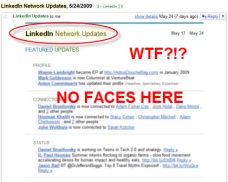
Finally, what prompted this whole post to begin with, and I’m not sure how widespread these emails are, was this customized visual that summarized who in your network has changed jobs. What a contrast to the old, text-heavy, anti-social LinkedIn of 2009 where “connections go to die” – the new LinkedIn is much more vibrant and connected with the world outside. Looks like they’ve taken Dave McClure’s advise from over a year and a half ago when he berated them and screamed, it’s all about the faces.
First I read through a longish piece outlining how Forbes is re-inventing itself into a hub that harvests it’s audience and transform them into content producers in a new media factory. Then I read about how Gawker is embracing the transformation of the web into a visual medium, prepping their web pages for the eventual living room, lean-back consumption model.
And now I click through (via twitter of course) to land on this abomination of design from MSNBC.
I count no less than twelve potential interaction points to share or otherwise spindle this piece back into the social-sphere. This isn’t even counting the 50+ links that are drawing me off this page. I guess what really sends me off are the four icons next to the scroll bar. Some genius thought that click through rates on those little gee-gaws increased engagement. Look at it, there are only two lines of the article above the fold!
All I can think of is that this site is looking like that kid in your neighborhood who would deck out his bicycle with fancy horns, reflectors, and baseball card/clothespins on the rear wheel to make his old Scwhinn look cooler than it really was.
I think we’re in the awkward, adolescent stage of Mass Media adoption of social media. Eventually more sane minds will prevail and attention and praise will flow towards more nuanced design. Less is more my friends, really.
I moved my blog from a dedicated host over to Laughing Squid’s cloud service (thanks Frank and Zahaib for your help!). Some hiccups with the images coming over on the wrong directory but some delicate SQL surgery fixed that. Think of this post as a sort of Social Media isotope to make sure that what gets posted here makes it out the other end in one piece and as intended.
Oh, the image? Just want to say the move to the cloud was easier than I thought. Hopefully this post proves that it resulted in a soft landing.
I ran across some notes from the Web 2.0 Expo back in April that are still relevant and worth sharing. Today I’ll post on the talk that Jyri gave on Building Sites with Social Objects, tomorrow I’ll post notes from a talk given on iPhone Development Anti-Patterns.
Jyri Engestrom founded Jaiku which was later acquired by Google and is involved in some of their most interesting social networking products including Google Latitude. In his session, he started by giving a quick run down of successive social networks from the past emphasizing that despite media coverage of facebook (and more recently twitter), the game is far from over:
Firefly, grew to 2M users, acquired by Microsoft Six Degrees, grew to 3M users, folded Friendster, grew to 90M users, collapsed under it’s own weight MySpace, tens of millions of users, acquired by Fox Facebook, over 250M users, still growing and independent
The game is not over. We are still talking about a segment of the population. Social Networks have not (yet) replaced e-mail, sms, or the telephone as the lowest common denominator way to get in touch with someone.
Jyri went on to describe how social networks are built and what differentiates a successful social network from others that fail. Most importantly, social networks are about connecting people but there needs to be a catalyst to drive that connection, something with a tangible incentive. Using the metaphor of kids gathering to play together on the beach, Jyri explains that they gather together around a common object, such as a ball. In this same way, people connect around something he calls a “social object.” Think of all the successful social networks and you can see this pattern:
YouTube – video clips digg – links flickr – photos last.fm – music tracks good reads – books slideshare – presentations
In each case, there is a shared object that drives the connection and draws outsiders into a conversation. Bringing up the case of Russell Beattie, Jyri talks about LinkedIn. It’s a useful but only as a profile service, a place to showcase your resume and people don’t connect around profiles. I would argue that LinkedIn has been improperly categorized as a social network when, in fact, it’s more accurately a crowd-sourced recruitment database.
Jyri then went on to list out the steps towards designing a successful social network:
1. Define the Social Object. 2. Define the verbs around the object. For example, – eBay – buy/sell – flickr – upload/favorite – dopplr – add a trip – upcoming – add/watch an event
The Activity Strea.ms group has been doing some work here and their wiki and mailing list is a great resource. They have catalogued a number of common verbs and are attempting to unify these verbs to enable broader sharing and connectivity across social networks.
3. Promote the sharing of objects with easy to use tools – ensure all your objects can be adddressed by permalinks which can be emailed – create embedable widgets so that bloggers can promote attractive galleries of your social objects. Think flickr badges. 4. Turn invitations into gifts. Each invitation sent by your members should have an immediate value attached in the payload of the message. The days of “Register or click here to see more” are long over. 5. Charge publishers, not the spectators. The people that use your platform to further their financial goals should pay to access your audience.
Finally, Jyri spoke about the future. I’ll add my own observations in here as well because I’ve been doing a lot of thinking about this too.
As with the Russell and LinkedIn, the days of connecting just to goose your numbers are over. Twitter is the latest to inherit this behavior and while it may be valuable to have a large number of followers, it makes little sense to follow too many people yourself. As Robert Scoble has realized, the less people you follow, the better the signal.
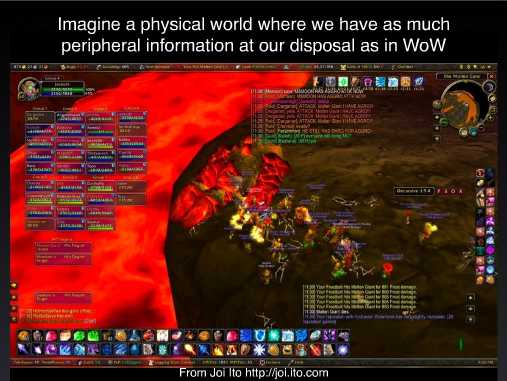
Future behavior on social networks will be to enhance what Jyri calls, “social peripheral vision” Citing examples such as the head’s up display on World of Warcraft, Jyri tries to imagine a world where your physical world is annotated with data about their interaction your social network.
Today it is still very early in the game. Each of us, with our lifestreams and status updates, are firing off signals like “pulsars into space.” The tools we use to monitor and keep up with are friends are still very primative and much of the talk is about trying to keep up or make sense of it all. In this sense, as we consume a combined lifestream of all our friends, we are not unlike ham radio operators, sifting through the radio bands and sharing notes as we look for a signal, a pattern.
Jyri concluded his talk describing something he called “nodal points” which is he uses to describe a, “pattern or algorithm that pulls information out of data.” It is this pursuit of nodal points that we are seeking. Each social network should have it – it’s where the collective commentary draws a pattern that represents a greater intelligence. Think of flickrs’ Shape files, the clusters of headlines on Techmeme, or the still fallible trending topics on twitter. These are nodal points and each successful social network should have them.
So here’s Jyri’s checklist for a successful social networks.
Define a social object
Define a set of verbs & actions which can be taken on the object.
Aggregate the social objects and annotations by the community to create nodal points.
I’m not so sure how the whole Facebook namespace landrush is going to work out for me (cheeky of them to have us all sit around camped out facebook.com on a Friday night!) but for now I’m going with this twitter card as a way to get my social media dialtone for now. To make you’re own, just edit the source at twitter.com and crop to fit. Or, if you’re lazy, you can use the Twitter Meishi Generator.
Cookie Consent
We use cookies to improve your experience on our site. By using our site, you consent to cookies.
Contains information related to marketing campaigns of the user. These are shared with Google AdWords / Google Ads when the Google Ads and Google Analytics accounts are linked together.
90 days
__utma
ID used to identify users and sessions
2 years after last activity
__utmt
Used to monitor number of Google Analytics server requests
10 minutes
__utmb
Used to distinguish new sessions and visits. This cookie is set when the GA.js javascript library is loaded and there is no existing __utmb cookie. The cookie is updated every time data is sent to the Google Analytics server.
30 minutes after last activity
__utmc
Used only with old Urchin versions of Google Analytics and not with GA.js. Was used to distinguish between new sessions and visits at the end of a session.
End of session (browser)
__utmz
Contains information about the traffic source or campaign that directed user to the website. The cookie is set when the GA.js javascript is loaded and updated when data is sent to the Google Anaytics server
6 months after last activity
__utmv
Contains custom information set by the web developer via the _setCustomVar method in Google Analytics. This cookie is updated every time new data is sent to the Google Analytics server.
2 years after last activity
__utmx
Used to determine whether a user is included in an A / B or Multivariate test.
18 months
_ga
ID used to identify users
2 years
_gali
Used by Google Analytics to determine which links on a page are being clicked
30 seconds
_ga_
ID used to identify users
2 years
_gid
ID used to identify users for 24 hours after last activity
24 hours
_gat
Used to monitor number of Google Analytics server requests when using Google Tag Manager
1 minute
You can find more information in our About Me and .