I’ve been playing around with the most recent upgrade to the Nokia N900 and it really is like Christmas. There are so many little tweaks to the core OS that it really is like having a new phone again. Geek Christmas.
After reading about Jason’s experience, Skype video calling was the first thing I tried. Skype chat has been running on the phone since I got it but it’s nice to know that I can run video chat as well when the fancy strikes me. I called around to a few people in Finland and the video and voice quality was surprisingly good over 3G. Google Video chat is supported as well but the quality on Skype was much better.
Droid theme
Instead of reading all the coverage, I thought I’d just poke around for a few days and see what I found. Here are the highlights:
The browser now officially supports portrait mode. No need to hack it and you’ve got basic navigation on the bottom to so you don’t have to keep flipping back and forth between landscape and portrait.
In Settings > Text Input there is an option to add a virtual keyboard. I later read that it was there before.
No need to use the Sym key to enter numbers! A longpress will use the alternate number or symbol.
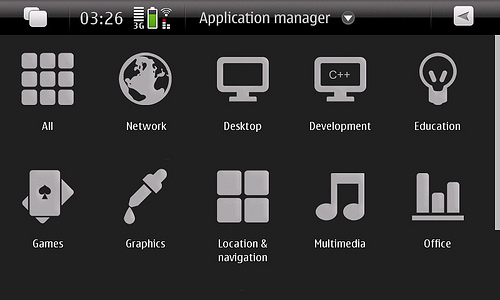
You’ll definitely want to add the extra repositories to the Application Manager (here’s how) to sample all the cool projects folks are working on. Do this at your own risk of course but anyone with an N900 knows that right? Some new apps to recommend:
One note, BarrioSquare, the FourSquare client for the N900, fails on this release. You can get it working again, just fire up vi and edit a single line in barrioConfig.py and modify a single line. Fixed in the latest update of BarrioSquare!
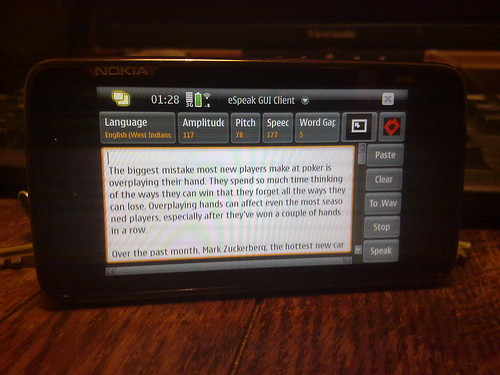
One of the coolest apps I found was eSpeak, an opensource text to speech reader. It has controls for amplitude, pitch, speed, and other controls that you can tweak to get it sounding ok but what I thought was really cool is that not only does it come with a bunch of languages including Esperanto (!), it also can read your text is one of seven English accents.
eSpeak
Here’s a clip of the West Indian accent reading a popular email newsletter. See if you can guess which one. (sorry, overplayed.mp3 clip lost to the sands of time)
The N900 is a tinker’s delight. There is so much you can do with this little box. You can root it, run xterm, install the latest Chrome browser. Check out the Instant Community prototype built by some students in Tampere along with Nokia Research, peer-to-peer disposable social networks.
Oh, and I should say the basic phone software improved, the sound quality seems better to me and I also get the feeling that performance has been optimized to improve battery life.
Mike Manos has joined Nokia as VP of Service Operations and has been tasked to build the cloud infrastructure for our Ovi services. The New York Times calls him a “data-center celebrity” and reading his blog certainly shows the knowledge and experience he brings to the table. His initial post gives a hint of his methodology which I really like.
I recently spent a good part of a weekend putting together deck furniture for my home. It was good quality stuff, it had the required parts and hardware and not unlike other do-it-yourself furniture it had directions that left a lot to be desired. In many ways its like IT Infrastructure or running any IT shop. You have all the tools, you have all the raw components, but how you put it all together is where the real magic happens, and the directions are usually just as vague on how to do it.
One of the common themes across all steps of the deck furniture pieces was a common refrain, ‘Do Not Tighten Bolts”. The purpose was to get all of the components together, even if a bit loose, to ensure you had the right shape, all components were in the right place, and then and only then do you tighten the bolts.
If you really want to know the secret to putting together solutions at scale, remember the “Do Not Tighten Bolts” methodology. Assemble to raw components, ensure you have the right shape and that all components are in the right place, and then “Tighten it down.” This can be and is an iterative process. Keep working to get that right shape. Keep working to find the right component configuration. Tighten bolts. As I built my first deck chair, there was significant amounts of trial and error. The second deck chair however was seamless, even with the same cruddy directions. Once you learn to ‘Not Tighten’ technique the assembly process is quick and provides you with great learnings.
With a Nokia N95 and a Lego Mindstorm NXT kit you too can have robots solve your Rubik’s cube. The folks at ARMflix have programmed an old N95 to take a photo and analyze the pattern on a Rubik’s cube and have it sent over to the Mindstorm rig to run through the moves required to solve the puzzle.
It was a sad day when I read the ReadWriteWeb post about the rumored shutdown of MyBlogLog. Yahoo has since come out with a vague response that pulling the plug is only one of several “options” but I thought it good to post a few things you can do now just in case they do take MBL out behind the shed.
MyBlogLog Outage Screen, we only used it once
Grab your Stats
If you’re a pro user, visit your blog’s stats page and run a report to get your stats. You run reports by clicking on the report tab on the right-hand side of the second row of tabs. There are several options showing the type of data you can get. Run a few reports on just a few days to see what’s there and then go for it. After running a report, you can highlight the data, copy then paste it into Excel or Google Docs as a .csv file and then do things like filter and sort.
If I recall correctly, the report routine would choke if you threw too much data so if it hangs, try to chunk it into smaller timeframes. I’d recommend monthly which you can later aggregate onto a spreadsheet.
Tighten your Connections
Use the Friender feature to find any of your contacts that are on MyBlogLog. The way this works on a high level is that it suggests people that are connected to two or more of your contacts but not connected to you. For more info on Friender, you can read the original post announcing the feature.
Once you’ve found all your friends on MyBlogLog, you can use the Connector feature to see how you’re connected to everyone and fill in the missing blanks. If you follow someone on twitter and are connected to him on MyBlogLog, the Connector will tell you how to find them on flickr, delicious, Pownce (ok, that will no longer work), digg, last.fm, and YouTube. You can click each link to their prospective profiles and friend them there or click the uber-arrow on the right and spawn multiple tabs for each service. More on the Connector on this post.
Back up your Contacts
One of the great things about MyBlogLog is that each person’s MyBlogLog profile is a pointer to all their other profiles on the internet. I was going to suggest to manually save those that were important to you but then Manny, one of the old MyBlogLog engineers, whipped up a Python script that uses the MyBlogLog API to archive everything for you. It creates a directory on your hard drive (Windows & Linux only) and creates up to four files for each contact (sites authored, an hcard file, a list of their communities, and a list of services). Here’s what you need to do.
1. Download the script (right-click & save as mbl_depart.py)
2. Install a Python interpreter such as Python 2.6.4. Remember, this script only works if you’re on Windows or Linux. Once you’ve installed Python, copy the script into the same directory where you installed Python.
3. Edit the the script with a text editor and replace “foo” with your Yahoo API key. If you don’t have one, you can login to Yahoo and go to the YDN site to request a key. You only need the Generic key because you do not need to authenticate to read the data you are getting.
4. Run “cmd” to get a DOS window, navigate to the directory then run the code with your MyBlogLog username as the parameter. For example,
cd c:\python26

python mbl_depart.py iankennedy
The script should then run in the command window (if not, you may need to add your python directory to your path variable). The script will save all your data to the directory where you installed pythonin a directory the with the same name as your username. Subdirectories will be there for all your contacts.
Subscribe Directly
Another cool things that MyBlogLog did was aggregate all your contacts’ activity into a news feed which we called New in My Neighborhood. We called blogs Communities so it kinda fit. Aggregated feeds of the social activity of your contacts are nothing new and FriendFeed famously went on to build out a service exactly like this. Take a walk down memory lane and have a look at the communities that you follow and use the Subscribe widget on the Community page to subscribe directly to each site’s feed in the RSS reader of your choice. As for social profiles, you can use the Connector described above to directly subscribe to any of your friends’ activity.
Likewise, you might want to message everyone following your blog via using the MyBlogLog messaging feature and remind them that they can subscribe directly to your blog and provide pointers to your other profiles that you want to promote.
That’s it. Now you’re safe with all your contacts backed up should anything happen to the service.
Check out Alternative Widgets
Should the service ever get taken offline, it’s a good idea to have alternatives scoped out should you need to switch over.
Recent Reader Widget – TwitterCounter has a cool little widget that shows the face of recent twitter visitors who have opt-ed into their service. Google Friend Connect is also similar but more about community members, not recent visitors.
New with Me widget – Mark Krynsky has an excellent gallery of different services on his Lifestream Blog.
Coda
If you’re reading this post because you were a member of the MyBlogLog community, I hope that this post at least provides you with a way to get your own copy of everything you put into the service. I’ve been assured by someone at Yahoo that the earlier post stands and there is no final decision on the future of MyBlogLog. Until then, as with any hosted service, it’s always good to have your own copy.
It was great working on MBL as the Product Manager, the team was stellar and they are all doing interesting things, albeit now outside of Yahoo. Some of the innovations we launched there are all glimpses of services that now exist as entire businesses.
I’m a big believer in hacking together a working prototype to demonstrate product ideas. Powerpoint mocks basically put a shiny gloss on a paper sketch and because it’s not real, generate endless debate where no one is really speaking on authority because the product doesn’t exist.
Once you have a prototype the debate becomes substantive. Prototypes trump PowerPoint every time. Building a quick prototype is a way of sketching an idea – the emphasis should be on quick on dirty – get the pieces working with real data to see how things move, that’s it. Expect reactions and expect that you’ll need to tear it apart and redo things, that’s ok – expect that people might hate it and you’ll throw it away. Because of that, don’t invest too much time or ego into your prototype either, it will change, guaranteed. In this sense, churn is good.
This is why I really enjoyed Paul Buchheit’s post Communicating with Code where he writes about how both GMail and AdSense came together.
Of course none of the code from my prototype ever made it near the real product (thankfully), but that code did something that fancy arguments couldn’t do (at least not my fancy arguments), it showed that the idea and product had real potential.
The point of this story, I think, is that you should consider spending less time talking, and more time prototyping, especially if you’re not very good at talking or powerpoint. Your code can be a very persuasive argument.
GMail & AdSense were born from working prototypes, not PowerPoint. Whenever possible, try and avoid PowerPoint for product design, unless it’s for art.
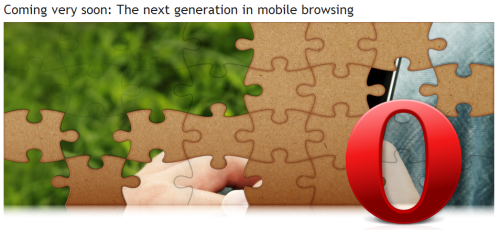
Opera has a cryptic splash page on its site announcing something wonderful in the near future for mobile browsers. What will it be? Intomobile says that hints can be found in the source (I couldn’t find anything). What will it be?
If you want to read more substantive thoughts on the future of mobile browsing, check out Russell’s latest posts (one) and (two).
I heard this line somewhere but can’t attribute it to anyone. Did a search on Google, Yahoo, and even Bing and didn’t find any mention of it either. In an increasingly interconnected world, when one social network is connected with another, if you can’t share something, does it count?
The Nokia Booklet (stands out better in the search results than “netbook”) is not the first time Nokia has entered the PC market but it’s announcement took many people by surprise.
As the lines between what is a laptop and what is a smartphone blur, it’s fascinating to see how a PC companies like Apple and Dell and a phone company like Nokia define this new form.
Like the old Reeses commercial from the 70’s, do you like your 3G, GPS, and 12 hour battery in your laptop or do you like a full-featured browser with flash support and xterminal on your phone?
What follows are notes from a session I attended at the last Web 2.0 Expo. While a few months old, the notes here are still very relevant. As a Nokia employee, some may think it strange for me to blog about how to develop for the iPhone but I think not, the priciples I share here apply to all mobile developers.
The presentation was given by Toby Boudreaux. Point of clarification before we begin. For those unfamiliar, an anti-pattern is a play on design patterns which are re-usable design components that emerge to become commonly understood elements used in User Interface design. A common user interface anti-pattern is the hover text box that obscures an otherwise important part element of the user experience.
On to the iPhone UX Anti-Patterns from Toby’s talk
Billboards & Splash Screens
While it your logo may look cool in all it’s glory and scrolling credits for everyone on the team including the office dog is also seems like a nice thing to do, your users will tire of it after a few times and will get down right annoyed if they use your app with any frequency. Best to tuck this stuff down as a sub-menu off the About menu. In short, “don’t put branding ahead of users.”
Sleight of Hand
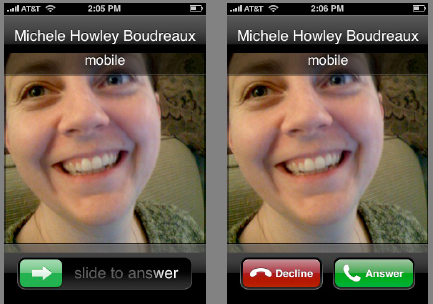
Do not use the same area for different or conflicting functions. Think of muscle memory and make sure that the same gestures are related. Toby illustrated the problem with the iPhone’s slide to unlock and decline functions.
A quick and easy way to avoid this anti-pattern is to print out wireframes of your design and overlay each screen on top of each other over a lightbox and to be careful where your exit or quit button is going to be, assuming that your users may add an extra tap by mistake.
App as OS
When the app is running in a mobile environment, it tends to take over the screen giving the user the impression that the application is the OS. Rather than attempt to mediate the entire experience of the device through your app, defer to specialized apps which are designed to handle those functions. Use the YouTube player for videos, the browser for web pages.
Bullhorns
Tone down any loud notifications. You can provide a setting to make them louder but remember, you’re embedded into a mobile device which is going to be carried everywhere. If possible, avoid pop-up error messages and embed your error message into the interface.
The Bouncer
If your app requires a user account, make sure every screen that can be accessed without a login has a link to registration or sign-up. The last thing you want to do is have a potential registered user land on a login screen with no link to a page where they can register.
The High Bar
Allow for progressive degradation of your application. Remember, you’re app is operating in a mobile environment. Assume that connections will be flakey, the phone not running the latest OS. Remember the guy on the bus that’s just gone into a tunnel. What about the one-handed user on the subway? Can he they use your app effectively?
Memory Lapse
Make sure your application is able to persist state. There’s nothing worse than having to step back through to get back to where you were. The illusion of fast task-switching, pausing and unpausing, requires state persistence.
Gesture Hijacking
Take care not to take over and re-define a popular gesture. It’s a balance because you also don’t want to try and be too clever and introduce a new behavior that has too steep a learning curve.
Spin Zone
Don’t rotate the screen for the heck of it. Fancy UI elements to be used in moderation.
Sound Off
Don’t hijack audio that is already playing. This is a common one. How many times have you been listening to music and then start playing a game that requires you jack the volume way up. When you quit out of the game, you blast your ears off as your music player comes back on.
It’s much better to blend the sounds so the user can take care to switch to the background app and shut it down or pause it.
Apple has done a lot of careful thinking about interface design on the iPhone expanding their work on the Human Interface Guidelines to the mobile environment. The iPhone HIG is a good resource for anyone designing for the mobile environment.
Hope these iPhone UX Anti-Patterns were useful. Can you think of any others?
Cookie Consent
We use cookies to improve your experience on our site. By using our site, you consent to cookies.
ID used to identify users for 24 hours after last activity
24 hours
_gat
Used to monitor number of Google Analytics server requests when using Google Tag Manager
1 minute
_gac_
Contains information related to marketing campaigns of the user. These are shared with Google AdWords / Google Ads when the Google Ads and Google Analytics accounts are linked together.
90 days
__utma
ID used to identify users and sessions
2 years after last activity
__utmt
Used to monitor number of Google Analytics server requests
10 minutes
__utmb
Used to distinguish new sessions and visits. This cookie is set when the GA.js javascript library is loaded and there is no existing __utmb cookie. The cookie is updated every time data is sent to the Google Analytics server.
30 minutes after last activity
__utmc
Used only with old Urchin versions of Google Analytics and not with GA.js. Was used to distinguish between new sessions and visits at the end of a session.
End of session (browser)
__utmz
Contains information about the traffic source or campaign that directed user to the website. The cookie is set when the GA.js javascript is loaded and updated when data is sent to the Google Anaytics server
6 months after last activity
__utmv
Contains custom information set by the web developer via the _setCustomVar method in Google Analytics. This cookie is updated every time new data is sent to the Google Analytics server.
2 years after last activity
__utmx
Used to determine whether a user is included in an A / B or Multivariate test.
18 months
_ga
ID used to identify users
2 years
_gali
Used by Google Analytics to determine which links on a page are being clicked
30 seconds
_ga_
ID used to identify users
2 years
You can find more information in our About Me and .


![Reblog this post [with Zemanta]](http://img.zemanta.com/reblog_c.png?x-id=207f6535-17fd-492e-a9cd-2140541e49dc)