Nokia prides itself on making a durable phone that can withstand daily wear and tear. The short video below gives you a look inside the test center where they drop, bend, and tumble the phones to see if they can stand up to whatever our customers can throw at it.
But some tests can’t be simulated. Someone recovered their phone from inside a cow and today The Sun reports that a fisherman recovered a phone that spent a week in the belly of a 25lb cod.
For some more wincing field tests, be sure to check out what these crazy Russians have put their Nokia 5800 through.
UPDATE: There’s more! Someone in Wisconsin found a Nokia in their bag of potato chips. No word on whether it was still working though.
I am not sure what to make of this. I’m all for making toys realistic and all but working at Nokia, we’re all about trying to make mobile mobile devices more playful and fun. So it’s weird to see a Leapfrog making a toy phone more, um, business-like.
Featured at last week’s Japanese iPhone Developer’s reception hosted by Six Apart I saw Finger Piano, a cool little app that allowed you to play the piano on your phone. As the bars move down towards the keys, you press them to carry the tune.
The thing I like about this video? The fact that it requires a friend to play.
I had a chance to visit the KDDI Design Center in Harajuku right at the base of Takeshita-dori (well worth a visit if you get a chance) as well as a few electronics stores to see what’s on offer from the major operators. Here’s some of the highlights of what I saw.
Casio’s Exilim 8.1 megapixel phone
The obligatory 8.1 megapixel camera phone. Some of the specs include a wide angle lens, a 3.1-inch, 480 x 800 pixel OLED display, and a video mode that films in VGA at 30 frames per second.
Reviewed on engadget.
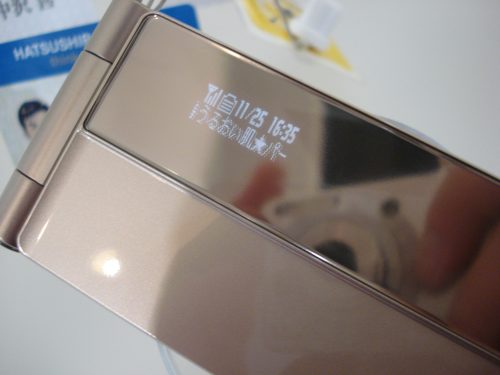
Over 90% of the phones in Japan are flip phones so the outside cover display is important for things like date/time, signal & battery meters, and scrolling message previews. Many of the models I saw featured a display that was behind a mirror type cover (you can see my camera in this photo) that makes these displays more subtle when they are sitting out on the table during a meeting. Some of the models offered for women double as mirrors so you can check your make-up.
Animated Cover Display on Japanese Cellphone
The graphics on the phones were truly stunning. Not only was the resolution magnificent, the graphics complimented the fit and finish of the phones beautifully. The example to the left is the settings page for the phone’s bluetooth feature. The idle page (as people in Nokia call the homescreen of the phone) was also a place where a lot of time was spent to create an experience with beautiful visualizations of simple things such as the time.
Cellphone Bluetooth Settings Screen
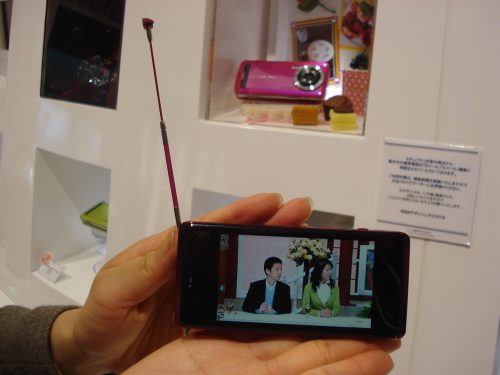
The average person spends two hours a day on the train commuting to and from work or school so many phones have built in television antennas to pick up broadcast TV using a technology called 1seg. These phones are equipped to make the transition to digital television next year and, with enough on-board storage, could even begin to act as pocket Tivos.
Broadcast TV via Cellphone
I’m still learning the ins-and-outs of the cell phone operator business but it’s curious why we don’t see more of these phones outside of Japan. The Japanese domestic market is cut-throat and margins on these devices are razor thin so there’s not a lot of money to be made on these devices for the manufacturers that make them (indeed, Nokia’s pulled out of marketing devices for the Japanese market for all but their high-end Vertu brand).
When I asked around, people told me the PR and marketing of having a leading device was more important than the revenues. I can see what they are driving at when you see a specialized sports phone branded by G-Shock and the 8.1 megapixel camera phone from Casio as well as the TV phone by Sharp. Each of these devices help position their company for their other products and become extensions of their other products.
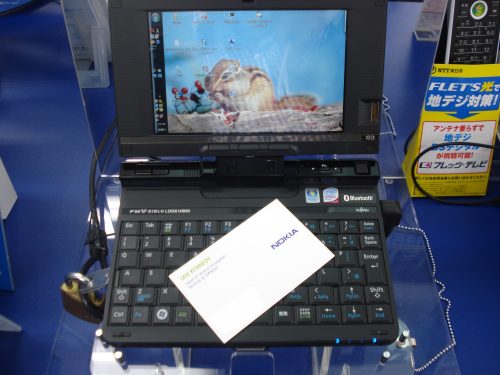
The last image is obviously not a phone but I include it because it’s an example of the full featured laptops that are on sale from the cell phone vendors. They are subsidized so you can pick one up for under $100 with a two year wireless data plan (about $40/month). Most run Windows XP so if you throw Skype onto one of these things along with your bluetooth headset, it could work as a phone.
Fujitsu Netbook
Yes, that’s a standard sized business card on the keyboard. Don’t think anyone’s going to write the next great novel on this machine but it certainly is an impressive feat of miniaturization!
Following up on yesterday’s post about more unique uses for GPS, here’s some stuff I’m running on my Nokia E71 which I’m finding really useful.
Traffic Pilot – download the client to your phone and turn it into a traffic sensor. When running, your location is tracked and used to determine average speed. Crowdsourcing everyone who is running Traffic Pilot is then used to figure out if a road is congested or not. I’ve been using Traffic Pilot for the past few weeks and comparing it to traffic reports on NPR and KCBS and it’s often determined congestion before the incidents are reported on the radio.
Included is a link to “Traffic Report” which will read off conditions for the roads in your area with a helpful scroll bar so you can rewind back if you miss something. Coming soon, Traffic Pilot will use your daily commute patterns to learn which routes you take and send you an SMS if there’s any trouble reported on any of the routes.
Screenshot – useful tool I found to take screenshots of your cellphone screens. It’s not “signed” for the E71 so you need to use the Symbian Signed site to upload the .sis file and get a link to a signed versionThere’s no “camera” key on the E71 so you need to change the default. I use the Backspace key with the 2 second timer.
Google Maps with Streetview – it’s now out for Nokia’s Symbian OS. Figure out what that dive bar your friend told you about looks like from the street.
Skype Lite – for low-cost international dialing. I use it when connected via wi-fi.
Sports Tracker tracks your workouts and plots them on a map which you can share with your buddies. You need a MicroSD memory card (SanDisk 8GB microSD) to run it for some reason. Nokia Research is hosting a version of Sports Tracker that runs on an E71.
Be sure to check out the Solace theme which brings in all the N86 icons and adds a nice gloss to the menus.
With low cost GPS tracking devices, it is now make it economically feasible to electronically “tag” people and things that you love. A couple of examples:
But no one has come up with the most obvious application suggested to me by Yahoo Researcher Marc Davis. It’s got to be out there. Has anyone added the ability to turn on your phone’s GPS from a desktop browser so you can find your phone when you’ve lost it?
When devices get more personal, it is increasingly more important for people to brand their device to signal their personality. Watches have always been a popular vehicle to carry corporate brands. In Silicon Valley it’s become popular to slap stickers on your laptop to show your allegiances. As devices move mainstream, embedded branding is a premium for which people pay extra.
The example above is of a Hello Kitty netbook that comes from Japan (available in the US from the grey marketer, Dynamism). Most have seen the Prada phone (photo) but in Japan I also saw a new phone branded by Coach.
Other examples above include the Yahoo shortcut embedded into every phone you buy from Softbank which I hear also requires each buyer of the iPhone to set up a Yahoo account and set Yahoo to the phone browser’s home page before you can leave the store. The Disney phone didn’t do so well in the United States but due to the ravenous popularity of the little mouse items in Japan, I think it will fare much better.
What other examples of successful branding have you seen?
I was at the local Mobile Monday event last night to learn more about Yahoo’s Blueprint development framework and soak up some of the local mobile scene. One of the presenters, sorry, didn’t catch his name, was the UI Designer and he Bill Bull, Head of Platform UED, made a very insightful comment about web development.
usatoday.com is a website – our expectation is that it will change every day as new content is available.
Microsoft Word is an application – we expect it to work the same way every day.
Modern websites such as Facebook or the new Yahoo (Metro) home page are a collections of widgets that change and update themselves as new features get pushed out. It’s a mistake to think of widgets installed on a mobile device as applications, they need to be architected as dynamic pieces of code that can update themselves as new features become available or as new devices offer new capabilities. The update mechanism is a fundamental feature of any web-enabled widget.
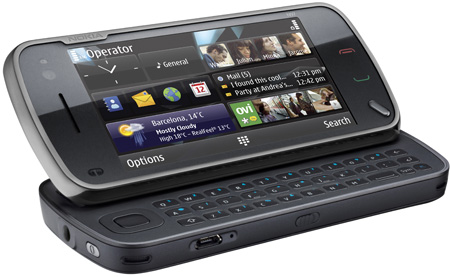
I was going to write a post about all the amazing phones I saw last week while I was in Japan but this morning’s announcement of the latest Nokia device trumps that. Techmeme is smothered with coverage.
Nokia N97
I’ve been watching the convergence of the smartphone and laptop computer into a single device called a netbook. While Verizon is subsidizing Dell netbooks, Japan’s EMobile will give you an Acer netbook for $100 if you sign up with them. Instead of jamming a desktop OS into a tiny form factor, Nokia is approaching it from another angle and building from the mobile device up with a collection of swappable widgets.
The difference in approach is that a tiny laptop netbook is designed to run client software while the powerful phone netbook is designed to be an extension of web services that you run out of the cloud, optimized with GPS sensors and a camera for data capture.
“A netbook is for the coffee shop or airplane or subway ride. For watching a movie, checking email, updating Twitter, fast, mobile stuff,” writes Dave Winer. For that, I think the N97 fits the bill quite nicely.
Cookie Consent
We use cookies to improve your experience on our site. By using our site, you consent to cookies.
ID used to identify users for 24 hours after last activity
24 hours
_gat
Used to monitor number of Google Analytics server requests when using Google Tag Manager
1 minute
_gac_
Contains information related to marketing campaigns of the user. These are shared with Google AdWords / Google Ads when the Google Ads and Google Analytics accounts are linked together.
90 days
__utma
ID used to identify users and sessions
2 years after last activity
__utmt
Used to monitor number of Google Analytics server requests
10 minutes
__utmb
Used to distinguish new sessions and visits. This cookie is set when the GA.js javascript library is loaded and there is no existing __utmb cookie. The cookie is updated every time data is sent to the Google Analytics server.
30 minutes after last activity
__utmc
Used only with old Urchin versions of Google Analytics and not with GA.js. Was used to distinguish between new sessions and visits at the end of a session.
End of session (browser)
__utmz
Contains information about the traffic source or campaign that directed user to the website. The cookie is set when the GA.js javascript is loaded and updated when data is sent to the Google Anaytics server
6 months after last activity
__utmv
Contains custom information set by the web developer via the _setCustomVar method in Google Analytics. This cookie is updated every time new data is sent to the Google Analytics server.
2 years after last activity
__utmx
Used to determine whether a user is included in an A / B or Multivariate test.
18 months
_ga
ID used to identify users
2 years
_gali
Used by Google Analytics to determine which links on a page are being clicked
30 seconds
_ga_
ID used to identify users
2 years
You can find more information in our About Me and .





![Reblog this post [with Zemanta]](http://img.zemanta.com/reblog_c.png?x-id=76193c79-dd02-4a48-88ac-4b0ba89eaa51)


![Reblog this post [with Zemanta]](http://img.zemanta.com/reblog_c.png?x-id=bb69a10f-c43b-4a58-9bba-027a0a3a3a39)