Category: Work

  • Squitters

    Some internal discussion here on people that grab brand name Twitter handles so they can later sell them to the highest bidder. Like the domain squatters of old. Remember Joshua Quittners mcdonalds.com stunt? Yahoo colleague Ryan Kuder came up with the term.

    squitter n. an individual who grabs a brand name twitter handle for future profit.

    Let’s see how long these stay open:

    http://twitter.com/mcdonalds is taken.

  • What is a Product Manager anyway?

    My 5 year old daughter just started Kindergarten this week and she asked me to explain to her exactly what I did at Yahoo so she could convey this to her class. She barely uses a computer so I was a bit challenged but then I remembered a great post by Susan Mernit that summed it up nicely.

    When I describe my job to non-techie friends, I like to say it’s like being the executive chef in a big restaurant because as big piece of my job is deciding what to send out when, and another is to review and roll up all the possibilities and then recommend what we actually build and empower the teams that build it.

    We’ve been washing the pots and pans for the past little while but once that’s done, the chefs are chomping at the bit to put out some great new stuff.

  • And in other news this weekend

    NBC pulls its content off of iTunes, thinks it can force Office fans to pay $4.99/episode from a site called Hulu.

    The gamble NBCU is making is that they can still make business decisions with their content that don’t include their customers. – Terry Heaton

    The talented ones will go first. Bad news for you, TV networks. You’ll be stuck with the shittiest creators, the timid ones who don’t dare cross the chasm. Your shows will get worse and worse. Your sitcoms will grow lamer, if that’s possible. Your reality shows will grow stupider. – Dan Lyons as Fake Steve Jobs

    Google News starts hosting newswire stores from AP, AFP, and others. Once they start running advertising, their transformation into Yahoo News will be complete.

    Well, we just saw the latest news on this front, with Google “trading for its own account” as opposed to its traditional role of handing off traffic to web sites it searches – Tim O’Reilly

    The news industry may very well have lost both the battle and the war because now Google is the world’s largest searchable newspaper. – Steven Hodson 

  • Bloglines beta – so nice to see ya.

    The Time & Newsweek of the Web 2.0 blogosphere both mention the re-launch of Bloglines. It’s great to see another reader on the market just for variety’s sake. I moved to Google Reader a while ago as my main reader mostly because of it’s mobile interface which looks great on the Blackberry. I had left Bloglines a good while back because of their annoying tendency to mark everything in a folder as “read” just because you opened it.

    In the release notes, they say they will address the lack of mobile support in a future release. If they solve this, I may actually switch back to Bloglines because they have two other features that are not in Google Reader.

    1. People wonder why I have Earthlink’s Reader as my home page on my browser. I tell them it’s the best way to browse full text feeds. I have my “firehose” feeds that post several times a day loaded up there and the Earthlink Reader is set up to scroll very quickly through them and has a handy marker which shows you when you start getting into articles that were current during your last session.

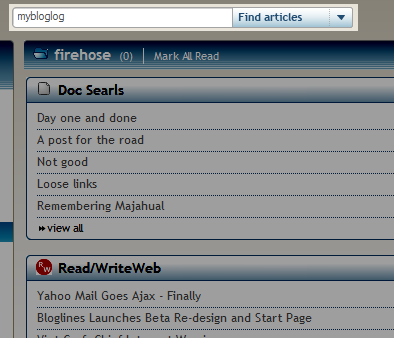
    As you can see in the screenshot up top, there’s a nice browse feature which toggles between the My Yahoo-like tile view which they call “Quick View” and a river of news view which scrolls the articles full text called “Full View.” Bloglines even includes “3-pane view” for all you Outlook/Newsgator junkies.

    2. Search. Logging back into Bloglines tonight I was re-acquainted with the Bloglines search. I had stopped using this feature since I left Bloglines and the only vestige of the whole sharing of your subscriptions community I had on Bloglines was from an old ego-search that used the aggregated subscriptions of all the Bloglines users as a way to focus on hits from quality blogs. From the main window, you can search and an advanced option gives you a whole lot of power that, as far as I can tell, isn’t available on any other reader platform. The integration to Ask’s broader web search is a bit clumsy but hopefully that will be addressed now that there seems to be renewed attention on Bloglines as a product.

    The ability to limit keyword searches to your subscribed feeds or search any other Bloglines user’s public feeds, is a very cool option. No need to bookmark things for later, just let it flow by knowing that you can always reach in and retrieve it, using your subscription list as a helpful filter on sources you trust. I suppose you could do this with Google Coop or Lijit but Bloglines does it in an integrated way.

    I’ll have to play around with this for a while; I noticed just now that Bloglines doesn’t seem to refresh as often for instance and I don’t see a “refresh” link anywhere on the Beta UI Paul Querna from Ask posts in the comments that Bloglines refreshes every 5 minutes or you can use “r” as a hotkey.

    Update: Nice, detailed review of the new Bloglines from Nathan Weinberg at Inside Google who interviewed Eric Engleman, the new GM of Bloglines.

  • BarCampBlock and the Great Beyond

    BarCampBlock Panorama

    I had a great time at BarCampBlock this past weekend. Regretfully, I could only attend on Saturday but got to soak in the scene and definitely will chip in and help out in future BarCamp events when I can. The excitement surrounding the sessions reminded me of the early BloggerCon events that got me into blogging in the first place. A lot of earnest excitement and a tangible electricity in the air that we had the ability to change the world and make things better.

    My favorite session was Brad Fitzpatrick & David Recordon’s discussion on Portable Social Networks where they made clear that they are trying to build a simple way to “glue” social networks together into a unified social graph that is openly accessible by anyone and everyone. The thought is that closed social networks which require you to drag all your friends along with you are distracting at best, destructive at worst. All this pulling people back and forth is resulting in frustration and friction which, if not addressed, will sap the ability of innovative new social networking services from gaining a significant audience and give any early adopters yet another username and password to remember. Additionally, there is the concern that existing solutions to pull your existing relationships along with you to the latest shiny object by crawling your AOL, Google, or Yahoo mailbox are training people to give over their username and password to untrusted third parties which is just asking for trouble.

    While the motives for a public database of relationships is simple enough (someone at the session described it like a Technorati backlink index for social networking links, “who’s linking to me?”), the true genius is the assertion by Brad and David that they are laser focused on the geeky bits of building the database as a platform and that it’s up to the community to figure out what they want to do with it and if anyone wants to build something to add value on top of it to, “go for it.” People will continue to search for jobs or recruits via LinkedIn, this service will only help fill in the missing blanks and make your LinkedIn network a better representation of who you know. If you have a good friend down as a connection on flickr, why shouldn’t you also be connected to them on LinkedIn? This yet-to-be-named service will highlight the gap and make it easy for you to act on it.

    In a later session on Open Authentication (now known as “o-auth”), David spoke of delegated authentication systems such as flickr’s in which you manage which services have access to your flickr photos. At anytime you have the ability to revoke any permissions that you have given. This let to a discussion of existing ways you let people get in touch with you and the need for a similar grant/revoke model for granting people access to you. If you’re outside of a social network such as Facebook where you can de-friend someone, an email address is the universal access key. Yet, these cannot be revoked and if you change your email address, it breaks for everyone including the person you’re trying to get away from. In this new world, maybe you can turn on & off access just as you would subscribe & unsubscribe from an RSS feed.

    Is email broken? Is this the vision of a world beyond email?

  • Ambition

    takeover.jpg

    “Oh, and one more thing just before I head home today”

    This note was spotted on one of the MyBlogLog engineer’s desks. Not too ambitious is he? I like the fact that it’s on a Post-It, just a reminder in case you forgot!

  • The Journey Begins – Consolidating multiple blogs to WordPress

    Over the years I have maintained blogs on a number of different platforms. I started in 2003 with Blogger moving later to TypePad and finally to Movable Type hosted on Yahoo Small Business. In order to simplify my life, I set out to bring them all together into a single domain. What follows are my notes on the process and what I learned along the way. This is a work in progress, check back for updates as I continue down this path.

    Preamble: Why WordPress? Why did you leave Yahoo Small Business?

    Short Answer: TypePad is a great place to start blogging and Movable Type on Yahoo Small Business is a pretty good solution for the more advanced user. I had played around with WordPress but basically I wanted to get down in the weeds with WordPress and I would never do that unless I made it my primary blogging platform.

    Long Answer: I needed to redirect all my traffic from cavitate.net to everwas.com. I have a number of links coming into the old domain so I wanted to use an .htaccess file to set up permanent redirects and preserve the search engine rankings. Yahoo Small Business doesn’t allow .htaccess so that cinched it.

    Those that know me know that I’ve been a huge fan of Movable Type (I used to work at Six Apart). I actually gave the MT4 beta a try just to see what it was like but when I had problems with the installation reading the MT-Static directory correctly (yes I did fiddle with the permissions) I ran out of patience. Frankly, I was itching to try a WordPress installation just to see what all the fuss was about. When it installed immediately and I began to play around with the template files, I was immediately impressed with its speed – no more rebuilding!

    Right, on to the journey!

    1. Exported all my TypePad entries and saved them to my desktop.

    2. Exported all my Movable Type entries and saved them to my desktop.

    3. Downloaded and installed WordPress into my new hosting account at Laughing Squid.

    4. Modified my DNS entries to point to the Laughing Squid name servers (they only provide hosting, no domain name services). I then waited a couple of days for the new DNS entry to propagate. Once I confirmed that I was able to reach my WordPress site via everwas.com, I got to work building the new site.

    5. Downloaded the Underscore Permalinks plugin. Because TypePad and Movable Type write their URLs with the underscore (_) in between the title words instead of the (-) that WordPress uses, activate this plugin before you import any of your old posts to preserve the trailing links on the url. This is important if you want to later use .htaccess to preserve your links. (oh great, I just read this!)

    6. It’s also important to preserve your old directory structure. Use WordPress’ Options > Permalink area to match your existing directory structure for your individual posts. Mine is [/%year%/%monthnum%/%postname%.html] for example. There are a number of resources which you should read carefully before you begin. The WordPress Codex page is a good place to start. Be sure to read the bit about running an SQL Query on the wp_post table in order to preserve the entire length of our URL.

    After the permalink structure is changed and the %postname% dashes have been set to underscores, an SQL Query must be run on the wp_post table in the WordPress mySQL database. This is because every Movable Type installation has a different %postname% length cutoff point. On the contrary, WordPress displays the whole URL. Before running this SQL query, replace “15” with the number of max characters in the %postnum% for the particular MT installation.

    UPDATE wp_posts SET post_name=SUBSTRING(post_name,1,15)

    You can find your Movable Type %postname% length settings under “Basename Length” under Settings > New Entry Defaults in MT 3.2x.

    Now you’re ready to import your old posts!

    7. My Blogger entries were the oldest. WordPress has a built-in importer which you can run from within WordPress. When you run the importer, it’ll ask for your Blogger username and password, Google will then ask if you want to grant access to Blogger from WordPress. Once you do that, it’ll pull everything over. Both Movable Type and TypePad entries imported easily (seconds!). Now I had all my text in one place. Comments and Trackbacks made it through with the URLs preserved. All was gravy. [I did have one false start but you can use Justin Watt’s excellent WordPress Suicide plug-in to delete everything and start over]

    Now my only problem is that all the images were now getting pulled from their original location. I needed to re-publish all these posts to point to their new home. There’s probably a better way of doing this. I could just upload all images to a location on my new host and run a SQL Query to replace their old hostname with the new but I took a manual approach in order to re-visit my earlier posts and re-format my images to fit the new template.

    Images

    8. Blogger: I saved all my images by going to each blogspot post and right-clicking on them and saving them to a “blogspot” directory I created on my hard drive. I think Blogger also offers FTP access but I only had a few posts with images so it didn’t take too long.

    9. Movable Type: I simply FTP’d into my Yahoo Small Business account and pulled down everything in my Images directory and saved it to a “mt” directory I created for them.

    10. TypePad was a bit more difficult because they don’t allow FTP access. I had to basically pull down each file using the TypePad File Manager to view the graphic in my browser window and then right click to save it. I saved all my TypePad images to temporary “typepad” directory.

    11. Starting with my oldest post in February 2003, I overwrote any entries for the old images and replaced them with a new one. I took the time to re-format them to fit the new template and if I found any dead links, took the time to update them. Call it a walk down memory lane, it was amazing to see how much things had changed! I’m working through the entries slowly but surely so if images are missing, that’s why.

    12. Added the MyBlogLog sidebar so I could see who’s visiting my new blog.

    13. Changed my Feedburner settings to read from my new xml file over at everwas.com using Feedburner’s FeedSmith plugin. I’m keeping the old feeds.feedburner.com/flashpoint address for now until I think through what I want to do about the existing RSS subscribers. If anyone knows a transparent way to take advantage of Feedburner’s domain mapping so I can move to a Feedburner-hosted everwas.com/feed url without interruption, let me know!

    14. Modified .htaccess to redirect www.everwas.com to everwas.com.

    RewriteEngine On
    
    RewriteCond %{HTTP_HOST} ^www.domain.com$ [NC]
    
    RewriteRule ^.*$ http://domain.com%{REQUEST_URI} [R=301,L]

    Also specified this preference in Google’s Webmaster Tools so all search results strip the www off the url.

    15. Yay! It looks like I can do future posts! Yahoo Small Business doesn’t provide cronjob access so this was a limitation I’m glad is behind me.

    16. Open hosting account on Laughing Squid for cavitate.net so I can set up a .htaccess file. Move DNS mappings to point to Laughing Squid DNS servers. Wait several hours for new settings to propogate.

    17. Create .htaccess file in root of new cavitate.net directory to permenantly redirect all traffic to cavitate.net/flashpoint/foo.html to everwas.com/foo.html. Mine is simple:

    Redirect 301 /flashpoint https://everwas.com
    
    Redirect 301 / https://everwas.com

    18: Added Google Analytics plug-in. There are several but I chose this one from Semiologic.

    To Do:

    • add favicon
    • Modify <title> on default template
    • Update Blogroll
    • add Blog Business Summit badge
    • add microid header to verify blog on claimid.com
    • update facebook profile
    • update flickr profile
    • update delicious profile
    • update upcoming profile
    • update linkedin profile
    • update Plaxo Pulse (wow! the new Pulse page looks good!)
    • update Yahoo profile page
    • update LastFM profile
    • update Yahoo Videos profile
    • update You Tube profile
    • update vox profile
    • add everwas.com to Google Webmaster Tools
    • add robots.txt file
    • update twitter profile
    • update yelp profile
    • add everwas.com to Yahoo Site Explorer
    • create sitemap using Chris Peason’s xhtml sitemap generator, submit to both Yahoo Site Explorer and Google Webmaster tools and add an entry for it to robots.txt
    • Configure Archives Page
    • Write About Page
    • message flashpoint members in MyBlogLog of new site
    • Create Widgets page for all the dynamic crap I’m always adding into my index page
    • install wp-chunk plug-in to shorten long urls in comments (so it doesn’t mess up layout)
    • install sociable plug-in for sharing with delicious, digg, and technorati
    • install Alex King’s popularity contest plug-in to display most popular posts in side bar
  • Andrew Keen as Linkbait?

    Unusually passionate post on the YPN Blog about Andrew Keen’s book, “The Cult of the Amateur,” which represents the latest backlash against the internet and social media in particular.

    Today’s internet is certainly changing our culture. But killing it? Hardly. In fact, I’d argue that the Gutenberg press, which ushered in a new era of print media in the 15th century, was far more disruptive. Then, more efficient printing led to a more rapid dissemination of information that in turn spawned revolutions (social, religious, scientific) that we’re still feeling the effects of half a millennium later.

    Killing it from the perspective of someone who is stuck with a fixed definition of culture. To me, culture is dynamic and evolving, not something you can hold up and compare as if you had some kind of cultural slide rule against which to compare everything.

    Lawrene Lessig skewers Keen’s arguments with an excellent post which holds up Keen as, “our generation’s greatest self-parodist.”

    the real argument of Keen’s book is that traditional media and publishing is just as bad as the worst of the Internet. Here’s a book — Keen’s — that has passed through all the rigor of modern American publishing, yet which is perhaps as reliable as your average blog post: No doubt interesting, sometimes well written, lots of times ridiculously over the top — but also riddled with errors. Keen’s obvious point is to show those with a blind faith in the traditional system that it can be just as bad as the worst of the Internet. Indeed, one might say even worse, since the Internet doesn’t primp itself with the pretense that its words are promised to be true.

    I have to confess, I missed Keen when he spoke most recently at Yahoo. He also spoke to a room of skeptical engineers at Google. I further confess that I have not read his book so I am only looking at the ongoing debate as a bemused spectator.

    What do you think – is the internet killing our culture or is Keen just stirring the pot to get some airtime?

  • Nielsen/NetRatings Total Minutes metric. Sounds nice, how does it work?

    magnifying-glass.jpgMaybe I’m missing something. In all the breathless, “the pageview is dead” stories that came out last week surrounding Nielsen/NetRatings’ press release that they will include “Total Minutes” as part of their ranking methodology, I couldn’t find any information on how the measurement would work.

    Don’t get me wrong, I’m all in favor of trying to nail down a metric to succeed the Page View which (rewards poor site design and discourages linking away) but I want to make sure that we don’t replace it with something worse. I often have multiple browser tabs open at any time and if I’m working on something like email, the whole browser goes into the background. Surely any urls that are “out of focus” are not being counted towards any kind of total time spent right?

    The Nielsen/NetRatings site is almost useless with only two page marketing .pdf about the NetView product which will carry the new metric. I could ask our metrics gurus at Yahoo but I want to call this omission out publically so others can benefit from the answer.

    I left a couple of comments out there pleading with someone with more time to call up Nielsen to find out more but nothing yet.

    ReadWriteWeb : Tyranny of the Page View Nearly Over?

    AllThingsD : Fun with Numbers

    I’ve also emailed Nielsen PR and will post what I find out.

    Here’s a list of FAQs forwarded to me by Netratings PR:

    Is time spent a new metric for NetView?

    No. We have reported Time per Person for several years. The only change is that we now report Total Minutes in addition to Time per Person.

    How do you measure time spent?

    Time spent tracking for a URL or application begins at the same instant where Unique Audience is credited. For a site, it is when the user-requested page call (text/html) loads. For an application, it is whenever an application is in focus on the browser.

    Time is credited to the URL or application as long as either the browser/browser tab including this site or the web application itself remains ‘in focus’ and there is no more than a 30 minute break in activity. If there is a 30 minute break in activity, we end the internet session and dial back the time spent for the last page or application to 1 minute.

    What does ‘in focus’ mean?

    ‘In focus’ refers to an application’s status on a user’s desktop. By application, this could include anything from a web browser to a Microsoft Office product to a web application like Instant Messenger.

    An ‘in focus’ application is in the foreground of the desktop. While other browsers and applications may be visible to the user, the ‘in focus’ application is the application that the computer knows to direct any keyboard or mouse activity. Therefore, only one application can be in focus at a time.

    What if a panelist has multiple browser tabs open?

    Only one browser tab can be in focus at a time for the same reason that one application can be in focus at a time. So it does not matter how many tabs are open, we only credit the tab that is in focus.

    If another application besides the browser is in focus (IM, Microsoft Word, etc.), none of the URL in the browser tabs are being credited for time.

    How do you measure this ‘in focus’ status?

    Our patented desktop meter resides on the panelist’s desktop so it is able to detect what application is in focus and appropriately credit time. Other metering methods – like a web proxy or site tagging – are generally only able to detect web calls and need to make assumptions on visibility/in focus status based on these calls

    What if someone leaves their computer?

    If a panelist is inactive for less than 30 minutes, the last site or web application in focus would receive credit for the accrued time. If more than 30 minutes elapse, the time would be dialed back to 1 minute.