Category: Work

  • Werewolves infect Webmasters

    Werewolves infect Webmasters

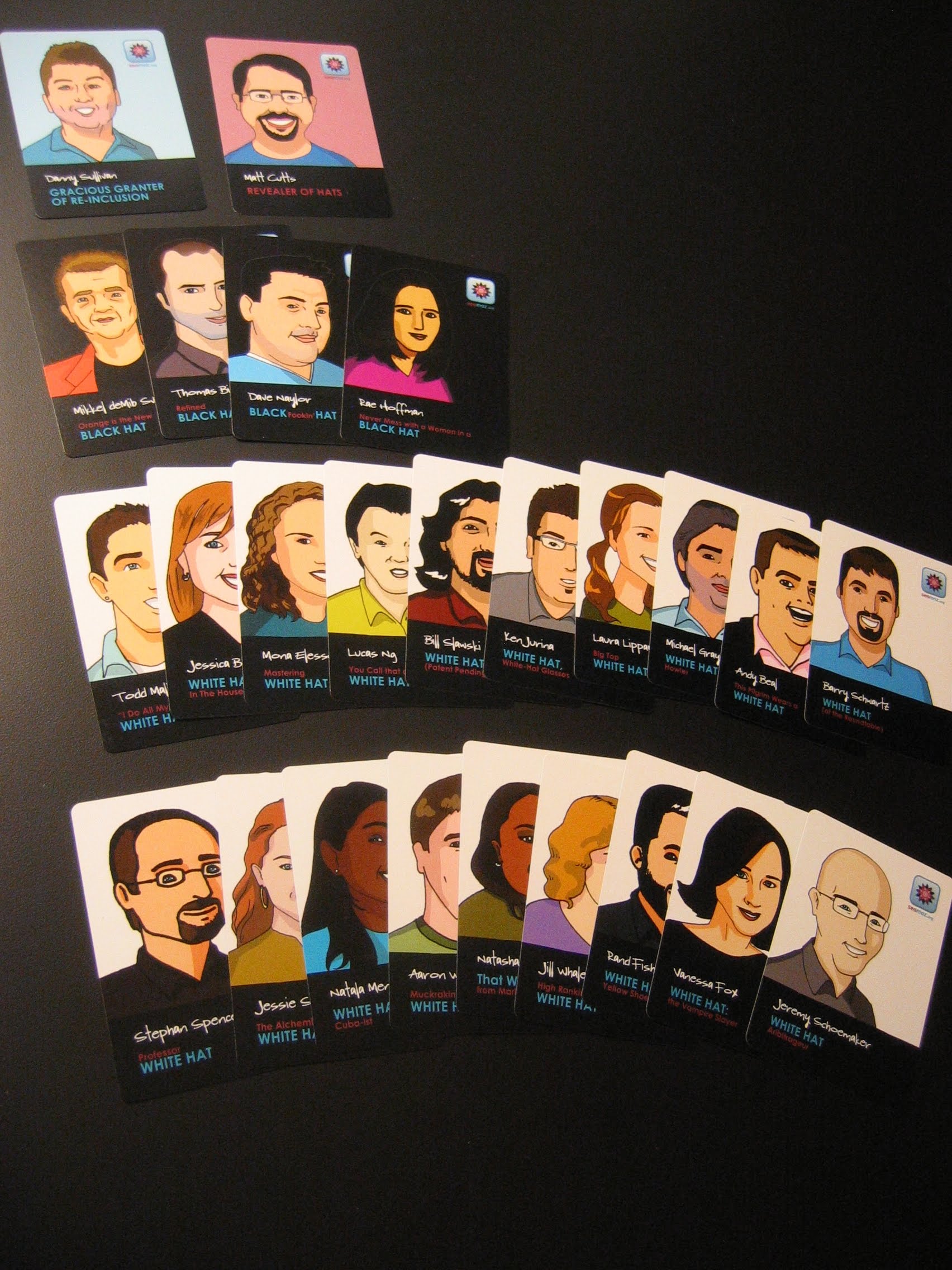
    Werewolf (also known as Mafia) is a great parlor game in which players try and figure out the good guys from the bad guys relying on your ability to read the body language of other players to determine who is telling the truth and who is lying while keeping your role and identity hidden from others. Because the game inspires psychological tactics and gaming, it’s the perfect way for a room full of SEO experts and search engine engineers to unwind after a full day of conference sessions here at Webmaster World in Las Vegas.

    seomoz.org did a great job setting the stage by printing up a set of cards specifically for the evening featuring notable personalities from the SEO industry. The titles on the cards were clever and the ultimate inside joke. In this version of the game, it was the Black Hats vs. the White Hats with Matt Cutts playing the role of the Seer and Danny Sullivan as the Doctor.

    Everyone had a great time (more photos here) and I can see this becoming a regular fixture (and highlight) of future Pubcon conferences. Thank you seomoz.org for hosting!

  • Vitality – what’s next?

    Back when Facebook announced it’s News Feed (then called the “mini-feed”) which aggregated all your friends activity onto a single, easy to scan page, there was a firestorm of controversy. What upset people the most was that this feed, which consisted of updates that, up until that time, had been scattered across each of your friends pages, now pulled everything together into a page which, at the time, seemed jarringly out of context. A single aggregation point was the right thing to do from a technical standpoint. Much like an RSS Reader made it easier to scan through the latest posts on your favorite blogs, the Facebook News Feed streamlined the process of keeping up with the latest activities of your friends.

    What didn’t sit right with the Facebook users was that by making the process of keeping up with your friends easier and more efficient, it crossed an unwritten privacy boundary. It was like that first time you looked up a phone number or someone’s name on Google. It felt like you were looking at something you weren’t supposed to see. Seeing these events spread out over multiple profiles, in context with other activities was normal but to have it all pulled together was almost too powerful and it was a shock.

    Facebook News Feed detail

    It’s only a few months later and now we think nothing of it. The fact that Facebook can pull this information together for us is nothing special and this kind of aggregation is now, as my colleague Todd Sampson likes to say, “the cost of admission” for any social network site. The one issue I’ve had with closed systems is that you’re limited with what you can do with data that you put in there. As soon as the News Feed was launched, I was poking around looking for the RSS output of the feed. The same when the Facebook API was launched. I was disappointed to find that Facebook did not allow you to pull the News Feed updates out of Facebook.

    This is by design of course. The News Feed is much more than a simple aggregation of your friends activity. There’s an algorithm working behind the scenes that calculates the proximity of your friends and does some filtering to show you more events from friends that you may care about and less from friends that are only tangential to you. We now know that the Facebook News Feed is also a key venue for Facebook’s advertising where endorsements and call outs to products are services are beginning to appear inline along with your friends’ updates.

    It’s inevitable that other social networks would catch on of course. Reservations about privacy melted away when publishing your profile activity became not only accepted but expected. The transformation was further solidified when Twitter changed the concept of friending into following. No longer did you need to declare someone a friend (which carries a social expectation) in order to follow their updates. It is now acceptable to follow someone’s updates because you trust their taste. You may not know them personally but you could still be a fan.

    Now we see multiple versions of the News Feed appearing on the front page of other sites front and center as a key part of what they offer. Plaxo Pulse was the first out the gate and shortly after Friend Feed launched with their simple aggregation. Wink as well and most recently I noticed that even LinkedIn has joined into the game.

    winkPlaxo Pulse

    Friend FeedlinkedIn

    Vitality, as we call it at Yahoo, is nothing new. What is most exciting about the aggregation of events, particularly when it’s done across open systems as it is in Plaxo, Friend Feed, and Wink, is what you can do with that data. If we go back to the RSS Reader example earlier, it’s one thing just to pull together events for your users’ convenience. What is so much more interesting is when you can begin to infer things based on the collective activity that you pull together.

    There’s a lot more work to do. In the same way that the MyBlogLog Hot in My Communities feature and the My Yahoo Top Picks module bubble up interests, or the Google Reader Trends page, and Bloglines Beta Top 1000 reflect popularity, the next step is to apply similar analysis to social activity.

    What kinds of tools and features would you like to see from an aggregation of your social vitality?

  • Getting back to what’s real

    After a breathless day at the office with multiple IM windows open, twitter updates pinging away in my snitter window and heavy discussions on internal email lists, I retreated to a dinner party with my suburban neighbors to unwind from the week’s events. My mind was bubbling over with thoughts from the day’s news and the significance for the valley’s latest star, Facebook and mid-conversation over a tumbler of Maker’s with my neighbor who builds HVAC systems for companies like Cisco, Google, and Yahoo my neighbor interrupts and asks, “What is Facebook?”

    Solipsists’ bubble popped I realize what a small corner of the world I exist. In the grand scheme of things, none of this really matters. With that in mind, allow me to share two items of mind-boggling impact that really send the mind reeling. These come to you via Todd Sampson, co-founder of MyBlogLog who sits next to me at the office and, in true renaissance form, has his fingers in all sorts of interesting developments.

    Fab @ Home – full plans for a kit that will allow you to “print” a 3-d object out of any material. Check out the video. Because blueprints for the objects are just files with instructions for the printer, it’s now possible to download plans for things like spare parts for your washing machine or even a wedding cake. Imagine being able to email someone a chocolate bar!

    Wired Science video on Body Builders which describes a process where researchers have been able to “grow” body parts for transplants.  Watch them grow a blood vessel which, after a few weeks, begins to pump blood on its own. Cell substraits are “printed” using recycled HP inkjet cartridges.

    In light of this news, advancements in social networking seem so, trivial.

  • Widget Summit, a conference done right

    Earlier this week I moderated a panel at Niall Kennedy’s Widget Summit. It was the second year for this event which he co-hosted last year at the same time, right before the Web 2.0 Summit to take advantage of all the people in town. I want to give a public shout out to Niall for hosting an excellent conference that paid attention to a myriad of little details that often get looked over at other conferences.

    Turn-by-turn directions, complete with Google Street view photos to help out of town drivers.

    A great web site for the conference. Links to each speakers’ Facebook and LinkedIn profile was really handy so you could get in touch with folks you didn’t get a chance to exchange cards. Adding the MyBlogLog badge was to my page was a nice touch too.

    The location (UCSF Mission Bay campus) was beautiful. The building was brand new and the colorful scheme made for a great backdrop for portrait photos. Lane Hartwell, the local flickr superstar, was the official photographer and has a great set online.)

    Two-sided conference badges. How many times have you spent an entire cocktail party wandering around only to realize that you’ve been going by Mr. Blank all night because your badge had flipped over. Apparently the design of the badge was inspired by a spirited discussion on a Flickr photo somewhere about badge design.

    Peet’s Coffee in take away paper cups. No fiddly china.

    The dinner for the speakers at the Slanted Door was an excellent choice and a great way to get the people that are helping define the widget space together. Thanks Niall!.

    A job board on the site because you know the widget companies are all looking for talent and they were all there.

    Thanks again to everyone that was there for making it an enjoyable two days. See you all next year!

  • Go on, cheat a little

    Yahoo has joined up with the folks at the New York Times crosswords to promote the new Search Assist feature with a contest. The idea is that you fill the puzzle out successfully and you too can be entered into a drawing for one of five trips to Hawaii. Thing is, this thing is a gimme. Next to each clue is a link to a “Hint” which runs a search in the pane below against Yahoo’s Search Assist which will serve things up for you right there and then. It’s a great way to show off the new Search Assist and may give you a new reason to work on your crosswords with the browser handy.

    I found out about this via a new group on Facebook. Join Yahoo! Pilot if you want to find out about the latest stuff going on at Yahoo! I can’t believe I found something not written up by the folks over at Yahoo! Cool thing of the Day, my usual source for tweaks and trivia about Yahoo – must have caught them asleep at the switch!

  • Yes, but ours go to “11”

    If you haven’t checked out the new Yahoo Search Assist, by all means do. Someone’s finally got the clustered search and suggestive results thing right. Type something into search.yahoo.com and hesitate just a bit and the pane will come rushing out with suggestions.

    On a lighter, Ryan Grove, one of the engineers who worked on the enhancements, points out that our search results now go to “11”

  • Mining the NYT Archives

    Dave Winer looks to the recently released New York Times archives as rich loam of fertile content upon which many applications can be built. In another life, as a product manager for factiva.com, I came to appreciate the meta-data the Times would attach to their content as something Factiva would leverage for its clients. Factiva provided investment banks and corporate libraries with content feeds from major news outlets and used meta-data on their sources (often adding additional meta-data of its own) so their clients would get precisely the content they were interested in and avoid having to wade through irrelevant results that were often the result of blunt keyword searches.

    If the global PR officers of Ford or Sharp were looking for breaking news stories, keyword searches on the internet would be nearly useless as they would pull in stories of used Ford cars for sale or someone’s “sharp” looking suit. These client would pay for the meta-data and Factiva’s taxonomy consultants would offer numerous tips & tricks to hone down their filters to find exactly what was required.

    With this in mind, I took a quick look at the source on the New York Times stories and found that they contain much of the meta-data that I remember.

    Today’s story on Iranian President Ahmadinejad’s speech at the UN contains the following meta tags:

    • byl= Warren Hoge
    • des= International Relations;Embargoes and Economic Sanctions;Atomic Weapons
    • per=Ahmadinejad, Mahmoud
    • org=United Nations;Security Counci
    • geo= Iran

    A business article on the arrival of the Microsoft game Halo 3 has the following:

    • byl=Seth Schiesel
    • des=Computer and Video Games;Computers and the Internet
    • per=Gates, Bill
    • org=Microsoft Corp;Sony Corp;Nintendo Company Limited
    • ticker=Microsoft Corp|MSFT|NASDAQ;Best Buy Company Incorporated|BBY|NYSE;Sony Corp|SNE|NYSE;Nintendo Company Limited|NTDOY|other-OTC;GameStop Corporation|GME|NYSE;Circuit City Stores Inc|CC|NYSE

    From this we can see elements of the nytimes.com taxonomy poke through.

    • byl – is the byline of the author of the story
    • des – the description and how this story is classified by the New York Times
    • per – nodes for individuals
    • org – company or organizational nodes
    • ticker – public company stock symbols and their listing exchange

    I’ve only just started playing around with this but using text from the meta-data fields and your favorite search engine you can already start to sort results in interesting ways.

    1. Articles about Mahmoud Ahmedinejad
    2. Articles about Gates, Bill
    3. News about Nintendo

    It’s still early days as it appears that the search engines have not crawled the archives completely and a quick check of older articles are lacking in most of this meta-data. It will be interesting to see what insights skillful use of the meta-data fields will yield over the next few weeks and what applications can be built on top of them.

  • MyBlogLog, more than just faces on a page

    Most people first notice MyBlogLog as the service behind the Recent Readers widget you see on various sidebars like the one over at TechCrunch, Yodel, or PassiveAggressiveNotes. Once you spend a little time with the service you’ll see that it’s a whole lot more. Yeah, we have stats. They’re basic but that’s the idea. Keep it short and sweet and give you a quick snapshot of the basics. Where your visitors came from, what they looked at, and where they went.

    hot in my communitiesOne feature that I feel is an overlooked gem is the “Hot in My Communities” area. On every person’s profile you’ll see this feature in the upper right hand corner. What’s here is a ranking of the ten most popular links from all the pages in your communities. For those that are not MyBlogLog users, communities are websites that you join during your travels across the web. You can either explicitly join a community or set a preference for the number of pages of a site you need to view before you are automatically joined (the default is 10). The idea is to keep the communities you join as you would a list of friends in a social networking site, ones that align with your interests. The Hot in My Communities feature is one reason why. We normalize this list against its overall traffic and popularity so that even if the site doesn’t get thousands of pageviews, if a link is “popping” on one of these sites, it’ll show up in your Hot in My Communities list.

    This feature is really cool and acts like a little recommendation engine. You should see a mix of sites that you’ve already visited and links that are most likely going to be interesting because it’s what others that share your reading habits are visiting. If your My Communities area is like a bookshelf of sites you visit on a regular basis, then the Hot in My Communities are is like a dynamic list of pages that have been dog-eared for reference. While a visit to a site like Techmeme gives you a view of what’s hot for everyone, Hot in My Communities is a filtered view of what’s interesting based on sites that you follow. A personalized view.

    Now that we have the integration of Yahoo IDs behind us the team has been going after some low-hanging fruit that we have wanted to get to for a long time. Today we released a feature that allows you to better manage your communities via the Hot in My Communities area. As you look through the list of links served up for your browsing pleasure, you’ll notice a question mark (?) next to each link. If you click on this link, you’ll get some information about which of your communities gave you this link. Just like you would manage your subscriptions in a feed reader, if you’re consistently getting irrelevant links within your list, you can chose to prune your Communities list and remove those that are not interesting to you. Conversely, if you are browsing someone else’s profile and you see a link you like, you can click through and join that community. Robyn has a nice write up on the feature over on the MyBlogLog log.

    Happy Browsing!

  • The Wall Comes Down

    Everyone wondered if the New York Times would be able to pull off their Times Select premium news experiment. Despite projections of up to $10 Million in annual subscription revenues as of Wednesday morning most areas of nytimes.com will be free of charge. This is excellent news for bloggers who will now be able to point to articles on the site and know their readers will be able to follow their references with our having to pay a subscription fee.

    Back when Times Select launched almost two years ago there was talk of driving subscriptions via an affiliate program. I guess that never really took off and now Vivian L. Schiller, senior vice president and general manager of nytimes.com admits that, “What wasn’t anticipated was the explosion in how much of our traffic would be generated by Google and Yahoo,”

    It’s widely known that more traffic comes into the site via search engine links and blog referrals than via the front door and if you’re not converting successfully via these entry points then you’re better off monetizing the traffic via advertising.

    It’ll be interesting to see if this puts pressure on wsj.com to open up as Rupert Murdoch, their new owner, has hinted.

    I still think that the optimal combination of free vs. premium is the one that I outlined two years ago when Times Select launched.

    Restricting access during the period when these pieces are the most valuable will drive subscriptions to TimesSelect. It makes less sense to keep these pieces under lock and key throughout the time when people are mildly curious to see what all the fuss is about and have the time to sample a frequently referenced article without having to commit to an annual subscription. I would prefer to see the program re-jigged so that TimesSelect members get first dibs on grokking the perspective of the day but after 48 hours the doors are open for any and all up until the 3 month mark when they drop back to a view which restricts non-subscribers to only the first few paragraphs.

    Open access to popular pieces for a three month period would help move low cost advertising inventory and allow for the fence-sitters to properly experience the quality of the Times’ news stream should they later decide they want to get access to this stuff prior the 48 hour embargo for non-subscribers.

    Call it Kennedy’s Rolling Window of news & perspective. The cheap seats only let you see what’s directly in front of the window while subscribers get to see not only what’s coming down the pike but also dig back and review what’s gone by.