Category: Work

  • Graphing Social & ETech

    photo by Scott Beale / Laughing Squid

    I’m in San Diego for the next few days attending both the Graphing Social Patterns and ETech conferences. I’ll be talking about the MyBlogLog API at 1:15 on Monday and will be on a panel about lifestreams following that at 1:30.

    Todd Sampson is here with me as well and we’ve got a couple of cool little hacks we’ll be showing people so look us up or visit the Yahoo both to learn more.

  • Launching Products, MyBlogLog style

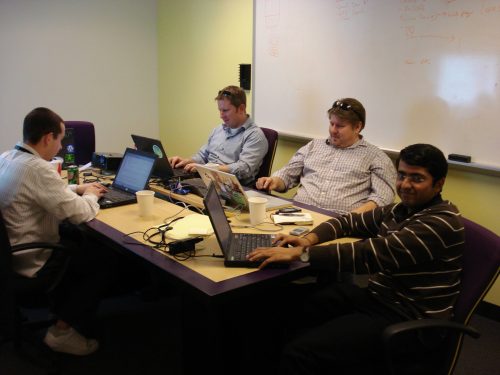
    from left, Manny Miller, John Sampson, Todd Sampson, and Saurabh Sahni

    Yesterday was one of the more exciting days of my time here at Yahoo, and I wasn’t even in the office.  MyBlogLog shipped a significant new feature which required the whole team to knuckle down and work as one. We hate to ship new code on Fridays so yesterday was the deadline to get something done before Todd & I head out to a week and a half of conferences.

    While activity levels were high all week, they really broke into a sprint at 9pm when we all logged on after dinner to quash out our final bugs.  I think at one point I had four or five different browser engines running (Firefox, IE, Safari, and even Flock) and next to my Windows PC I was also testing things on my wife’s MacBook.

    There was a group chat with all of us on it and, as we ran across things, I would throw them into the chat window to get resolved. A couple of us had other testers out there and they were in other tabs on our IM client so we would throw things between the tabs, channeling the excitement of others too as we sensed we were getting closer to launch.I wish I had saved a log from the running chat session because if you could read it, you would plainly see how closely tuned everyone on the team is to each others style.

    It was like a written version of the dance you see that goes on in the kitchen of a very busy restaurant. Everyone is running around but knows exactly where everyone else is, what they are doing and when it needs to come together.  Later in the evening, folks from the Bangalore team logged on and joined the fray. Distance didn’t matter – they were right there with us.

    I’m privileged to work with such a great team of talented people and am constantly bowled over by what they can do when they put their mind to it. We’re on a roll folks. There’s even more cool stuff on its way!

  • Hard at Work and Shipping Again!

    A quick note to let folks know that the MyBlogLog team made it through the staff reductions at Yahoo intact. Heads down is a common expression around here and it’s apt because we’ve been hammer and tongs on getting things built that we’ve been thinking about for a long time. It’s great to be shipping again!So far, our About Me widget has been getting rave reviews. We also have an API that’s in beta and spinning off some really interesting applications. Finally, yesterday we’ve got our updated Recent Reader widget into the wild and that’s getting great reviews. Congrats to the entire MyBlogLog team, especially Manny Miller who’s been in the weeds with the widget code from the start.

    We’ve got more up our sleeves and I’m looking forward to meeting folks at Graphing Social Patterns, eTech, and South by Southwest to talk about it.

  • Tuesday is MyBlogLog night

    There’s not enough MyBlogLog to go around! I’m speaking up in San Francisco at a NetSquared event about building non-profit communities on the cheap using on-line tools such as MyBlogLog. I’ll be joined by colleagues from Upcoming and Yahoo! Groups.

    At the same time, there’s another edition of the silicon valley Search SIG. This time around the topic is Search & The Social Graph and unfortunately I cannot be there because of my previous commitment above. We’re lucky to have Kent Brewster step up in my place. Kent’s done some bang-up work using the MyBlogLog API so I’m thrilled to have him represent us.

    UPDATE: for those of you who can’t attend my presentation in person, it’ll be streamed live over Ustream.tv on the Netsquared channel.

  • MyBlogLog API

    MyBlogLog API

    Thanks to an unsolicited write-up by Marshall Kirkpatrick over at ReadWriteWeb the story about the MyBlogLog API has been getting some coverage. The API is currently an invite-only beta while we get some people to take a look at it and give us some feedback. The API is interesting not only because of the public data such as user & site tags unique to the MyBlogLog index but also because of the ability for the API to act as a pointer to other sources of data.

    Each member on MyBlogLog has a “Services” tab which allows them to share pointers to their profile on other sites such as Digg, Twitter, Flickr, del.icio.us, etc. In this way, the MyBlogLog API can serve as a lookup that can tell you where to find someone on these other sites and pull together a more complete view of someone across the web. The MyBlogLog API delivers on a vision we’ve had for the service, a DNS for People.

    The web is a collection of digital artifacts. Text, photos, sound files are by-products that are digitized and indexed. We use search engines to locate these artifacts but no one has built a way to tie all these artifacts back to their owner.

    Until today. Yahoo’s very own Kent Brewster was quick off the mark with his own hack which surfaced links to these other profiles of recent visitors as well as, if available, the most recent Twitter post. Aldon Hynes posted at length this weekend and I look forward to seeing him explore member relationships using the API as he did so when he posted his detailed images of his MyBlogLog Social Graph.

    I’m really happy to see this vision of MyBlogLog API as a building block coming together and am proud to see MyBlogLog play a role in making these connections easier to find making the web a little easier to use. As with any effort such as this, there were numerous people that played a role in getting this off the ground but there are a few key individuals who deserve special mention:

    Chris Goffinet was the lead engineer who built the thing over the course of a week and then tuned the heck out of it over its several incarnations.

    Todd Sampson & Eric Marcoullier (MyBlogLog co-founders) have been pushing for this API since day one and are basically the API’s patron saints.

    JR Conlin & Kent Brewster (from the Yahoo Developer Network) were both invaluable for early feedback, cheerleading, and general code-wrangling.

    If you’re interested in getting on the list for the beta, sign up and let us know what you’re working on.

  • Multi-tasking, today is busy

    What happens when you get more screen real estate by adding a 24″ second monitor? You fill it up.  This has got to be a record.

    • 9 IM windows active (5 people from Yahoo, 4 from outside)
    • 9 Firefox tabs (one playing sound off of a video)
    • 6 Outlook windows (1 calendar appointment, 4 half-written emails, 1 reminder)
    • 1 File Download window (pulling down a mix tape mp3)
    • iTunes (idle)
    • Powerpoint
    • Excel
  • Nate Ritter’s one-man band media service

    I went to a meetup sponsored by Netsquared and saw Nate Ritter talk about how he was able to fill in during the power outages during the San Diego fires and keep us all informed on what was going on. Part of his amazing story is how on the first day he worked for over 12 hours with only one 15 minute bathroom break.

    Nate’s story was covered by Wired and highlights that he quickly ran into a limitation of the Twitter API which would crash if he posted more than 70 posts/hour (he eventually moved to posting directly into twitter.com).

    Other interesting tidbits include the fact that for some residents, he was the only game in town because power was done in most of the area (with other townships borrowing power from Tijuana to the south). In times of crisis, SMS messaging rules.

    The graphic posted above is from his talk, which he outlines on his blog. It’s a very basic setup where you drop a few feeds in on one end, usually filtered to sort on specific topics relating to your crisis at hand, and then Rube Goldberg-like, mush it all together using soup.io and then pump that RSS out to twitterfeed.com which will take any RSS feed and turn it into twitter posts. This is Nate’s basic setup which he’s re-purposed several times for other situations, most recently the floods in Northern California.

    The setup described above doesn’t take more than an hour to get up and running.  Looking at it really gets the gears turning. What kind of twitter feed would you setup at the wheels of something like this?

    I can think of a few services to add to improve it.

    • Yahoo Pipes for greater filtering
    • twitter’s “track” function to track mentions by keyword
    • Dave Winer’s twittergram to allow people to phone in updates from the field

    Can you think of any others?

  • next.yahoo.net

    There’s some cool blogging going on over at next.yahoo.net, a relaunched corporate blog that highlights the hacker culture at Yahoo.

    Sure, they just posted a short video of sound bites spliced together from interviews (Ricky Montalvo is a master) I did at a recent all-night hackathon. But there’s also other great posts including Havi’s summary of a thread on implicit & explicit which includes the complete video of David Weinberger‘s opening keynote from the first Defrag Conference held in Denver earlier this year which is well worth seeing.

  • A picture is worth a thousand words – Yahoo! Shortcuts for WordPress

    Yahoo ShortcutsWhen I write a blog post I make heavy use of the tabs in my browser so that I can switch back and forth between the blog compose screen and other screens where I do my research. I usually have my trusty image editor running as well so I can crop an edit any images that I use in my posts.

    For the past few weeks I’ve been playing around with a new WordPress plug-in (Yahoo Shortcuts) that will cut back on the copy-paste, rightclick-save, and other context switching by bringing content and references directly into the WordPress compose area. With this plug-in running, it scans your post for potential annotations that can turn a drab bit of hypertexed links into a gloriously illustrated work of art.

    For example, if I wanted to do a story about my hotel in where I recently stayed, all I need to do is include the address (3000 Paradise Road, Las Vegas, NV 89109) and Shortcuts will look for suitable information such as the map you see on this post and add it complete with text wrapping. All it took was a single click. Not only will Shortcuts search across shopping for product information, it can also pull in stock charts for companies, and Creative Commons images from flickr. The embeded graphics are beautiful so the temptation is to go overboard and embed the Shortcut “badges” willy-nilly. An alternative is to chose the “link” option which is a great way to add context to your post while keeping your viewers on your site.

    Some other examples where Shortcuts does the right thing. Hover over the link to view the contextual badge:

    • A chart for Dow Jones or (AAPL).
    • Shopping preview for the Nintendo Wii
    • A search preview for Barak Obama

    Once you’re done with your post, click the Review this Post button and you get a preview window where you can choose which links you want to embed, which you want to just enable with a popup, and which ones you want to ignore. This is key. Other products that automatically provide contextual links are an all or nothing affair. It’s vital to retain editorial control so you can choose which words or phrases you want to recognize. Yahoo Shortcuts does this. To get a sense of the how the plug-in works, check out the screencast.

    No more tabbing over to another window or fiddling around with HTML or CSS code, Yahoo Shortcuts just brings it all in so you can work with it right there and then, all on one page.

    Yahoo! Shortcuts plug-in for WordPress